<?xml version="1.0" encoding="utf-8"?>
<feed xmlns="http://www.w3.org/2005/Atom">

    <title type="text">stephenpanaro.com</title>

    <updated>2025-01-14T14:05:00Z</updated>
    <id>https://www.stephenpanaro.com/feed.xml</id>
    <link rel="alternate" type="text/html"
        hreflang="en" href="https://www.stephenpanaro.com" />
    <link rel="self" type="application/atom+xml"
        href="https://www.stephenpanaro.com/feed.xml" />
    <rights>Stephen Panaro © 2024-Now</rights>
    <generator uri="https://www.stephenpanaro.com" version="1.0">
        Me
    </generator>

    <entry>
        <title type="text">Deploying ModernBERT on Apple Neural Engine</title>
        <link rel="alternate" type="text/html"
            href="https://stephenpanaro.com/blog/modernbert-on-apple-neural-engine" />
        <id>tag:stephenpanaro.com,2025-01-14:/blog/modernbert-on-apple-neural-engine</id>
        <updated>2025-01-14T14:05:00Z</updated>
        <published>2025-01-14T14:05:00Z</published>
        <author>
            <name>Stephen Panaro</name>
        </author>
        <content type="html" xml:lang="en">
        <![CDATA[
        <span class="subhead">How to make it both fast and accurate.</span>

        <p>
            The recently released ModernBERT model is exciting. It takes several advances from recent decoder-only LLMs (think Llama, ChatGPT) and applies them to the encoder-only model that started it all: BERT.
        </p>

        <p>
            BERT-style models don't generate text but they are adept at understanding it. You can adapt (finetune) them for your custom problems, and they are small which makes them easy to deploy.
        </p>

        <p>
            They are small enough in fact that you can even embed them in an app and have them run on your phone.
        </p>

        <p>
            Apple devices all come with a special chip, the Apple Neural Engine (ANE), that is ideal for this type of model. Let's see what it takes to get it running!
        </p>

        <p>
            (Spoiler: if you've done this before, it's trickier than you might expect.)
        </p>

        <h2>Baseline</h2>
        <p>
            Let's do the bare minimum as a starting point. We can take the official model from HuggingFace and use Apple's coremltools to convert it to CoreML format. This format is required to utilize the ANE hardware.
        </p>

        <p>
            Conversion is straightforward:
        </p>

        <code class="codeblock" style="display: block; margin: 30px 0; white-space: pre; overflow: auto;">
from transformers import AutoModelForMaskedLM
import torch
import coremltools as ct
import numpy as np

class Model(torch.nn.Module):
    def __init__(self):
        super(Model, self).__init__()
        self.model = AutoModelForMaskedLM.from_pretrained(
            "answerdotai/ModernBERT-base"
        )
    def forward(self, input_ids, attention_mask):
        return self.model(
            input_ids=input_ids,
            attention_mask=attention_mask).logits

model = Model().eval()
input_ids = torch.zeros((1, 1024), dtype=torch.int32)
mask = torch.ones_like(input_ids)
ct.convert(
    torch.jit.trace(model, (input_ids, mask)),
    inputs=[
        ct.TensorType(name="input_ids",
                      shape=input_ids.shape,
                      dtype=np.int32),
        ct.TensorType(name="attention_mask",
                      shape=mask.shape,
                      dtype=np.int32,
                      default_value=mask.numpy()),
    ],
    outputs=[ct.TensorType(name="logits")],
    minimum_deployment_target=ct.target.macOS14,
).save(f"ModernBERT-base-hf.mlpackage")
        </code>

        <p>
            We can open the resulting model in Xcode and run a benchmark to see how fast it is.
        </p>

        <img  class="block-center" src="/static/blog/modernbert-on-apple-neural-engine/hf-baseline.png" alt="Xcode benchmark results for baseline huggingface ModernBERT CoreML model">
        <sub class="block-center image-caption" style="text-align: center;">Focus on: Median prediction time (small=good). Compute unit mapping (purple=good).</sub>

        <p>
            These are solid results considering we've barely done anything so far. Almost the entire model runs on ANE and it's reasonably fast. Surprisingly, if we open the performance report in Instruments, we can see that >40% of the model's latency comes from the few operations that don't execute on ANE. So the ANE portion is much faster than it initially seemed!
        </p>

        <img  class="block-center" src="/static/blog/modernbert-on-apple-neural-engine/hf-baseline-trace.png" alt="Xcode benchmark Instruments trace for baseline huggingface ModernBERT CoreML model">
        <sub class="block-center image-caption" style="text-align: center;">Representative prediction of the HF model. Notice: the CPU compute (large blue block) takes 138 of the 310ms! Most of the actual computation happens in 165ms on the Neural Engine.</sub>

        <p>
            Let's improve on this.
        </p>

        <h2>Hardware Optimizations</h2>
        <p>
            CoreML automatically optimizes models for efficient performance. Since we want to specifically target the ANE hardware, we will make modifications to further improve performance there.
        </p>

        <p>
            The baseline HuggingFace implementation offers niceties like customizability and GPU optimizations. These aren't important for ANE so to make things easier we will re-implement the model in a single file a la nanoGPT.
        </p>

        <p>
            The standard reference for this is Apple's 2022 post <a href="https://machinelearning.apple.com/research/neural-engine-transformers">"Deploying Transformers on the Apple Neural Engine"</a> which we will follow closely.
        </p>

        <p>
            The main change is replacing all linear layers with 2D convolutions. Both can perform the matrix multiplications we need, but the ANE is better at convolutions.
        </p>

        <p>
            Hand-in-hand with this, we will update all our inputs to be 4D tensors (think 4D matrix).
        </p>

        <p>
            The HF model uses a linear layer to transform a 3D input tensor with shape (<u>B</u>atch, <u>S</u>equence, <u>C</u>hannel <u>In</u>put) to (B,S,<u>C</u>hannel <u>Out</u>put) using a learned weight matrix (Cout,Cin). Our equivalent convolution will transform a 4D tensor (B, Cin, 1, S) to (B,Cout,1,S) using a weight (Cout,Cin,1,1).
        </p>

        <p>
            As you can see the resulting tensor shapes are the same, only in a different order.
        </p>

        <p>
            These changes alone speed up the model, but we will also adopt the custom attention implementation detailed in the post for an additional speedboost.
        </p>

        <p>
            We can confirm our re-implemented model is correct by comparing the output of our model to the HF model using a metric called KL Divergence. This measures the similarity of two distributions and a very small number is good.
        </p>

        <code class="codeblock" style="display: block; margin: 10px 0; white-space: pre; overflow: auto;">
&#x276f; python diff_torch.py
comparing answerdotai/ModernBERT-base to &#x1f917;
<span class="comment"># &hellip;</span>
kl div: &plusmn; 9.7043e-08
<sub class="block-center image-caption" style="text-align: center;">9.7e-08 is 0.000000097043</sub>
        </code>

        <p>
        For a more subjective comparison, we can look at the model's top predictions for the sentence <code>"The ocean is full of [MASK]."</code>:
        </p>

        <table>
            <tr style="text-align: left; font-size: 14px;">
                <th style="padding-right: 32px;">Probability</th>
                <th >[MASK] Replacement</th>
            </tr>
            <tr>
                <td class="mono">0.1060</td>
                <td>life</td>
            </tr>
            <tr>
                <td class="mono">0.0593</td>
                <td>sharks</td>
            </tr>
            <tr>
                <td class="mono">0.0507</td>
                <td>people</td>
            </tr>
            <tr>
               <td class="mono">0.0406</td>
               <td>fish</td>
            </tr>
        </table>

        <p>
            These are all reasonable completions, and their probabilities match the HF model exactly. Our new PyTorch model is looking good.
        </p>

        <h2>Speed and Accuracy</h2>
        We can convert our new optimized PyTorch model to CoreML just like before. As expected, it is faster:

        <img  class="block-center" src="/static/blog/modernbert-on-apple-neural-engine/optimized-xcode.png" alt="Xcode benchmark results for ANE-optimized ModernBERT CoreML model">
        <sub class="block-center image-caption" style="text-align: center;">Faster and more purple.</sub>

        <p>
            Looking at the performance report explains why. The large chunk of CPU computation we were doing at the end of the model has moved from CPU to ANE (the final blue CPU block is absent from the report). Despite this extra computation, the ANE section is also ~20% faster (165ms &rarr; 123ms).
        </p>

        <img class="block-center" src="/static/blog/modernbert-on-apple-neural-engine/optimized-trace.png" alt="Xcode benchmark Instruments trace for ANE-optimized ModernBERT CoreML model">
        <sub class="block-center image-caption" style="text-align: center;">Instruments trace of a representative prediction with the optimized model.</sub>

        <p>
            So speed is good, what about accuracy? Let's check the KL divergence of our CoreML model and HuggingFace.
        </p>

        <code class="codeblock" style="display: block; margin: 10px 0; white-space: pre; overflow: auto;">
&#x276f; python diff_coreml.py answerdotai-ModernBERT-base-1024-optimized.mlpackage "The ocean is full of [MASK]."
KL Divergence
Sequence only (excl. padding): 4.35444974899292
<sub class="block-center image-caption" style="text-align: center;">or 4.35e0</sub>
        </code>

        <p>
            Oh no! This is many orders of magnitude larger. Our model is fast but it has lost some accuracy.
        </p>

        We can check this subjectively by looking at the same sentence from before <code>"The ocean is full of [MASK]."</code>:

        <table>
            <tr style="text-align: left; font-size: 14px;">
                <th style="padding-right: 20px;">Probability</th>
                <th style="padding-right: 20px;">[MASK] Replacement</th>
                <th>&Delta; (%) to HF Probability</th>
            </tr>
            <tr>
                <td class="mono">0.0644</td>
                <td>people</td>
                <td class="mono">+0.0137 (+27%)</td>
            </tr>
            <tr>
                <td class="mono">0.0596</td>
                <td>life</td>
                <td class="mono">-0.0464 (-43%)</td>
            </tr>
            <tr>
                <td class="mono">0.0394</td>
                <td>sharks</td>
                <td class="mono">-0.0199 (-33%)</td>
            </tr>
            <tr>
               <td class="mono">0.0373</td>
               <td>fish</td>
               <td class="mono">-0.0033 (-8%)</td>
            </tr>
        </table>

        <p>
        "life" is no longer the top prediction and the probabilities have shifted noticeably.
        </p>

        <h2>Outliers</h2>
        <p>
            One feature of the ANE is that it uses float16 for computation.
        </p>

        <p>
            float16 can only express numbers between -65k and +65k and the closer you get to those large values, the less accurate. (Floating point numbers work by only representing a finite subset of all possible numbers and that subset gets more spread out as values approach the extremes.)
        </p>

        <p>
            These types of errors tend to compound in ML models, so they are a prime suspect for what we're seeing.
        </p>

        <p>
            Fortunately they also tend to show up in predictable places for modern LLMs. We can simply print the maximum values for an example sentence to see what they look like.
        </p>

        <code class="codeblock" style="display: block; margin: 10px 0; white-space: pre; overflow: auto;">
class Block(nn.Module):
    <span class="comment"># &hellip;</span>
    def forward(self, x, position_ids, attention_mask, sliding_window_mask=None):
        print(f"layer {self.layer_index} max: {x.abs().max().item()}")
        <span class="comment"># &hellip;</span>
        <sub class="block-center image-caption" style="text-align: center;">This is one of the places that large values can appear.</sub>
        </code>

        <p>
            For <code>"The capital of France is [MASK]."</code> we get:
        </p>

        <code class="codeblock" style="display: block; margin: 10px 0; white-space: pre; overflow: auto;">
layer 0 max: 8.465672492980957
layer 1 max: 21.899389266967773
<span class="comment"># &hellip;</span>
layer 11 max: 423.6680908203125
layer 12 max: 9862.669921875
<span class="comment"># &hellip;</span>
layer 20 max: 19701.166015625
layer 21 max: 19706.68359375
        </code>

        <p>
            Just as expected, about halfway through the model we start to see large values that grow up to 20-30k, depending on the input text.
        </p>

        <p>
            Let's compare this with the original BERT.
        </p>

        <code class="codeblock" style="display: block; margin: 10px 0; white-space: pre; overflow: auto;">
layer 0 max: 11.113615989685059
layer 1 max: 10.009736061096191
layer 2 max: 11.489322662353516
layer 3 max: 14.738886833190918
layer 4 max: 13.510597229003906
layer 5 max: 13.328920364379883
layer 6 max: 14.002219200134277
layer 7 max: 13.596477508544922
layer 8 max: 14.410932540893555
layer 9 max: 14.204751014709473
layer 10 max: 14.246857643127441
layer 11 max: 15.104483604431152
        </code>

        <p>
            These are much lower. This is very likely our problem.
        </p>

        <h2>Reducing Outliers with Rotations</h2>
        <p>
            Similar to how ModernBERT was trained using recent advances in decoder-only LLMs, we can borrow a technique used to quantize (compress) LLMs that should help with our outliers.
        </p>

        <p>
            Outliers makes quantization tricky, so there are many different papers and approaches. One is particularly appealing.
        </p>

        <p>
            Outliers show up due to the values in the learned weight matrices. For "reasons" models tend to settle on weight matrices that promote outliers in a few parts of the tensors the model is processing.
        </p>

        <p>
            If our linear layer (or, equivalently, convolution) has a weight matrix W, and our input is a tensor X, then we can write the operation to compute the output Y as:
        </p>

<code class="codeblock" style="display: block; margin: 10px 0; white-space: pre; overflow: auto;">
Y = X @ W
<sub class="block-center image-caption" style="text-align: left;">@ is the PyTorch symbol for matrix multiplication</sub>
</code>

        <p>
            The trick we will use to reduce outliers comes from two papers written at the same time: <a href="https://github.com/spcl/QuaRot/tree/main">QuaRot</a> and <a href="https://github.com/facebookresearch/SpinQuant">SpinQuant</a>.
        </p>

        <p>
            Both use a special kind of matrix, an orthogonal rotation matrix, that has a property such that: <code>Q @ Q.T = I</code>. This means that multiplying the rotation matrix Q by its transpose (flipped across the diagonal) gives us the identity matrix I.
        </p>

        <p>
        Since any matrix times I is itself, this allows us to rewrite our linear layer as:
        </p>

        <code class="codeblock" style="display: block; margin: 10px 0; white-space: pre; overflow: auto;">
Y = X @ I @ W
  = X @ Q @ Q.T @ W
  = (X @ Q) @ (Q.T @ W)
  = X' @ W'
        </code>

        <p>
        As long as we make sure that our new input to the linear layer is X' (original X times Q), we can replace the original weight with W' (Q.T times original W).
        </p>

        <p>
            Another fun property of Q is that when we multiply other matrices by it, it reduces the outliers by "smearing" them across nearby non-outlier values.
        </p>

        <p>
            So if we multiply all the weight matrices in our model by Q or Q.T in such a way that the Qs always cancel out, we should see lower outliers but still have a mathematically equivalent model. Pretty cool.
        </p>

        <img src="/static/blog/modernbert-on-apple-neural-engine/spinquant-activations.png" alt="3D plot of activation magnitudes before and after rotation from the SpinQuant paper" class="block-center">
        <sub class="block-center image-caption" style="text-align: center;">From the SpinQuant paper. Notice the vertical axes go from 16 &rarr; 2.5 and 60 &rarr; 5 respectively.</sub>

        <h2>A LayerNorm-Shaped Wrinkle</h2>
        <p>
            Unfortunately ModernBERT made two slightly contrarian choices that will make our lives a little tricky.
        </p>

        <p>
            Most modern LLMs use a normalization function called RMSNorm. ModernBERT uses a different one, LayerNorm. QuaRot and SpinQuant only work for RMSNorm models.
        </p>

        <p>
            The good news is that they provide a method to convert LayerNorm models into mathematically equivalent RMSNorm models.
        </p>

        <p>
            The bad news is that this method won't work out of the box for us because of where ModernBERT puts its first LayerNorm.
        </p>

        <p>
            Most models perform the first norm immediately before the first attention computation:
        </p>

        <code class="codeblock" style="display: block; margin: 10px 0; white-space: pre; overflow: auto;">
x = x + attention(layer_norm(x))
        </code>

        <p>
            But ModernBERT does it slightly earlier:
        </p>

        <code class="codeblock" style="display: block; margin: 10px 0; white-space: pre; overflow: auto;">
x = layer_norm(x)
x = x + attention(x)
        </code>

        <p>
            If you are visually inclined, the difference is easy to spot when you look at the model graph for ModernBERT and compare it to a model that follows the more common practice:
        </p>

        <img src="/static/blog/modernbert-on-apple-neural-engine/layer-norm-location.png" alt="netron graph of layernorm in normal transformer and modernbert" class="block-center">
        <sub class="block-center image-caption" style="text-align: center;">QuaRot+SpinQuant only describe how to handle the "normal" transformer case.</sub>

        <p>
            Naively wedging this LayerNorm into the same conversion method as the others destroys the model's mathematical equivalence and its outputs. If we work the math out by hand (which I will spare you) we can actually find a way to make it work by inserting a single extra matrix multiplication in the form of a convolution:
        </p>

        <code class="codeblock" style="display: block; margin: 10px 0; white-space: pre; overflow: auto;">
x = rms_norm(x)
residual_x = x @ R
x = residual_x + attention(x)
        </code>

        <p>
            The R matrix performs the operations that we would lose otherwise when replacing the LayerNorm with RMSNorm. An extra convolution would be nice to avoid, but its cost is relatively small compared to the rest of the model (only 0.19% of the model parameters).
        </p>

        <p>
            Most importantly it allows us to apply the Q matrix to reduce our outliers.
        </p>

        <h2>Rotated CoreML Model</h2>
        <p>
            Now we can take our original model, replace all LayerNorms with RMSNorm, insert our single extra convolution, and then replace all convolution weights with versions that are multiplied by the rotation matrix Q.
        </p>

        <p>
            We can see it closely matches the HF model:
        </p>

        <code class="codeblock" style="display: block; margin: 10px 0; white-space: pre; overflow: auto;">
&#x276f; python diff_torch.py
comparing answerdotai/ModernBERT-base to &#x1f917;
<span class="comment"># &hellip;</span>
kl div: &plusmn; 1.0101e-07
        </code>

        <p>
            Even though the rotated model is mathematically equivalent, we don't expect a perfect match in practice due to floating point errors. This lines up with the KL divergence we see.
        </p>
        <p>
            When we convert it to CoreML as before, we can see that our CoreML-to-HF KL divergence is much improved:
        </p>

        <code class="codeblock" style="display: block; margin: 10px 0; white-space: pre; overflow: auto;">
&#x276f; python diff_coreml.py answerdotai-ModernBERT-base-1024.mlpackage "The ocean is full of [MASK]."
KL Divergence
Sequence only (excl. padding): 0.00017806502000894397
<sub class="block-center image-caption" style="text-align: center;">this is 1.78e-4</sub>
        </code>

        <p>
            And for our test sentence <code>"The ocean is full of [MASK]."</code>, the order now matches HF and the probabilities are much closer:
        </p>

        <table style="">
            <tr style="text-align: left; font-size: 14px;">
                <th style="padding-right: 20px;">Probability</th>
                <th style="padding-right: 20px;">[MASK] Replacement</th>
                <th>&Delta; (%) to HF Probability</th>
            </tr>
            <tr>
                <td class="mono">0.1058</td>
                <td>life</td>
                <td class="mono">-0.0002 (-0.1%)</td>
            </tr>
            <tr>
                <td class="mono">0.0617</td>
                <td>sharks</td>
                <td class="mono">+0.0024 (+4%)</td>
            </tr>
            <tr>
                <td class="mono">0.0496</td>
                <td>people</td>
                <td class="mono">-0.0011 (-2%)</td>
            </tr>
            <tr>
               <td class="mono">0.0408</td>
               <td>fish</td>
               <td class="mono">+0.0002 (+0.4%)</td>
            </tr>
        </table>

        <p>
            Excellent! Examining the outliers again, we can also see that they are greatly reduced (though still larger than BERT):
        </p>

        <code class="codeblock" style="display: block; margin: 10px 0; white-space: pre; overflow: auto;">
layer 0 max: 3.542017936706543
layer 1 max: 4.122846603393555
<span class="comment"># &hellip;</span>
layer 11 max: 66.40872955322266
layer 12 max: 769.3683471679688
<span class="comment"># &hellip;</span>
layer 20 max: 1025.390869140625
layer 21 max: 1023.6306762695312
        </code>

        <p>
            The Xcode benchmark results are also still just as fast. It seems the extra convolution has negligible cost.
        </p>

        <img class="block-center" src="/static/blog/modernbert-on-apple-neural-engine/rotated-xcode.png" alt="Xcode benchmark results for ANE-optimized ModernBERT CoreML model with rotations">
        <sub class="block-center image-caption" style="text-align: center;">Same speed, same purple.</sub>

        <p>
            Now we have a model that is both fast <i>and</i> accurate!
        </p>

        <h2>What's Now/What's Next</h2>
        <p>
            This is a solid starting point for ModernBERT on Apple Neural Engine.
        </p>

        <p>
            The code to convert and use your own CoreML models is available on <a href="https://github.com/smpanaro/ModernBERT-AppleNeuralEngine">GitHub</a>. Part of the motivation for re-implementing it in the nanoGPT-style was to make it easily hackable. The README has ideas for several areas that could be explored or improved.
        </p>

        <p>
            The most exciting one to me is adding support for different model heads. These are what allows BERT-style models to adapt to different tasks and makes them actually useful.
        </p>

        <p>
            Feel free to reach out to me on <a href="https://twitter.com/flat">twitter</a> or <a href="https://github.com/smpanaro/ModernBERT-AppleNeuralEngine">GitHub</a> if this is interesting to you!
        </p>

        ]]>
        </content>
    </entry>

    <entry>
        <title type="text">In Pursuit of Fast KV-Cached Attention for Apple Neural Engine</title>
        <link rel="alternate" type="text/html"
            href="https://www.stephenpanaro.com/blog/kv-cache-for-neural-engine" />
        <id>tag:stephenpanaro.com,2024-10-10:/blog/kv-cache-for-neural-engine</id>
        <updated>2024-10-10T14:05:00Z</updated>
        <published>2024-10-10T14:05:00Z</published>
        <author>
            <name>Stephen Panaro</name>
        </author>
        <content type="html" xml:lang="en">
        <![CDATA[
        <span class="subhead">Building a memory-friendly KV Cache with static shapes</span>

        <p>
        No one wants a slow LLM. Most LLMs run on GPUs and most methods to make them fast are tailored specifically to GPUs.
        </p>

        <p>
        LLMs can also run on Apple Neural Engine (ANE), Apple's efficient ML processor that comes in every new iPhone and Mac. Existing GPU optimizations do not easily translate to the Neural Engine which means you end up leaving speed on the table.
        </p>

        <p>
        Today we'll unlock some speed by adapting a popular optimization known as KV caching to the Neural Engine.
        </p>

        <div class="inline-aside" style="margin-top: 12px">
        Credit to Apple: this approach is largely the same as one they use in their own models. I've written about it <a href="/blog/inside-apples-2023-transformers.html">before</a>, but we'll dive a bit deeper today and add some improvements.
        </div>

        <h2>Attention Crash Course</h2>
        <p>
        To follow along it's helpful to understand the basic mechanics of a transformer LLM.
        </p>

        <div class="inline-aside" style="margin-top: 12px">
        tl;dr The number of tokens and cache size determines the number of rows in 3 matrices (Q, K, V). We multiply them all together to compute attention and let the LLM predict a new token.<br><br>If this is foreign to you, keep reading. Otherwise <a href="#after-intro">skip ahead</a>.
        </div>

        <p>
        An LLM processes a sequence of tokens (word chunks) and predicts what the next token will be. The process is known as a "forward pass", "LLM call" or "prediction". Repeated forward passes build up the words, sentences, and paragraphs of the LLM's response.
        </p>

        <object class="block-center" type="image/svg+xml" data="/static/blog/kv-cache-for-neural-engine/simple-prediction.svg" style="display: block;"></object>
        <sub class="block-center image-caption" style="text-align: center;">This LLM predicts that "Fa" follows "Mi".</sub>

        <p>
        Attention is a series of matrix multiplications that happens during the forward pass. It helps the model do a good job at predicting the next token.
        </p>

        <p>
        There are three matrices involved in attention: Q, K and V. They all have the same number of columns which is not particularly interesting today. The number of rows for each is determined by the number of tokens we're processing.
        </p>

        <p>
        Q has one row for each token where we want the LLM to make a next-token prediction.
        K has one row for each token we want the LLM to consider during its predictions.
        V is the same as K.
        </p>

        <p>
        The simplest case is we input some fixed number of tokens into the LLM: "Do re mi". This is 3 tokens so Q, K, and V will all have the 3 rows.
        </p>

        <p>
        Q's 3 rows mean the LLM will predict 3 new tokens: what comes after "Do", and "re", and "mi". We already know that "re" comes after "Do", and "mi" comes after "re", so we'll ignore those predictions but the prediction for what comes after "mi" is new so we'll keep that.
        </p>

        <object class="block-center" type="image/svg+xml" data="/static/blog/kv-cache-for-neural-engine/q-size-relations.svg" style="display: block;"></object>
        <sub class="block-center image-caption" style="text-align: center;">The LLM predicts 3 tokens here, but typically we ignore all but the last.</sub>

        <p>
        K and V's 3 rows mean the LLM will consider all 3 tokens when predicting what comes next. So the LLM will make a prediction for what comes after "mi" based on "Do", and "re", and "mi", and their positions relative to each other.
        </p>

        <object class="block-center" type="image/svg+xml" data="/static/blog/kv-cache-for-neural-engine/k-size-relations.svg" style="display: block;"></object>
        <sub class="block-center image-caption" style="text-align: center;">You usually wouldn't let an old token like "Do" look at new ones like "Re", but it is technically possible.</sub>

        <p>
        A more interesting case is where the LLM takes a smaller number of tokens as input, and also some K and V matrices that were computed in a prior forward pass. Following a similar example: the input token is now "fa" and we also pass along a partial K and V, each with three rows that correspond to "Do", "re", and "mi".
        </p>

        <p>
        Q will now have 1 row, from "fa", and the LLM will only predict a new token to follow "fa".
        </p>

        <p>
        K and V will have not 1 but 4 rows! The 3 for "Do", "re", "mi" that were passed in plus one new row that the LLM generates for "fa". This allows the LLM to make a well-informed prediction since it can still look at all 4 rows of K and V to see what came before "fa". Importantly, it produces exactly the same results as passing all 4 tokens as inputs to the LLM.
        </p>

        <object class="block-center" type="image/svg+xml" data="/static/blog/kv-cache-for-neural-engine/qk-size-relations.svg" style="display: block;"></object>
        <sub class="block-center image-caption" style="text-align: center;">V is also made up of 3 re-used rows, just like K.</sub>

        <p>
        This process of reusing K and V is the KV caching that we want to implement today.
        </p>

        <p>
        Now that we know how the shape of these matrices corresponds to our input tokens, we can touch on the actual computation for attention.
        </p>

        <p>
        First we multiply Q by K. We have to transpose K (swap its rows and columns) for the matrix multiplication to work.
        </p>

        <p>
        Next we take the result of this multiplication (with Q's number of rows and K's number of rows as columns) and apply a function called softmax. This doesn't change the matrix's shape. This matrix is multiplied by V in the second matrix multiplication which gives us a final matrix that has the same shape as Q originally.
        </p>

        <p>
        This final matrix then proceeds on through the rest of the LLM. There is more to attention, but this should be enough to follow along below. <span class="inline-aside">(If not, let me know on <a href="https://twitter.com/flat">Twitter</a>.)</span>
        </p>

        <h2 id="after-intro">Neural Engine Constraints</h2>
        <p>
        It is often convenient to vary the internal workings of an LLM on the fly. The Neural Engine does not allow this.
        </p>

        <p>
        For a model to run on the ANE it must have input, output, and intermediate matrices that all have static shapes. They cannot change between calls to the model. The computation graph of the model must also be static. This means no conditional branching even if the intermediate tensors have the same shapes.
        </p>

        <p>
        Both of these constraints can be slightly relaxed in some circumstances but we will stick with the rigid definition for simplicity.
        </p>

        <h2>Static Shaped Attention</h2>
        <p>
        We need to pick static sizes for the matrices Q, K, and V. The number of columns is predetermined and constant, so we only need to choose the number of rows. Let's start by focusing on just Q and K, the first attention multiplication, for simplicity.
        </p>

        <p>
        We'll give K 512 rows. This means the LLM can look back at 512 recent tokens (word chunks) at most in order to predict the next token. This is usable and we can scale it up if needed.
        </p>

        <p>
        Picking a size for Q is more interesting. The size of Q is equal to the number of input tokens. This size determines how many tokens we can add at once to K for future predictions (typically >1) and how many new tokens we want to predict (typically 1).
        </p>

        <p>
        These correspond to the two stages of KV-cached LLM processing. Pre-fill: when the LLM ingests your prompt and builds up a cache. Generation: when the LLM responds.
        </p>

        <p>
        Since we are restricted to static sizes we need to pick a Q that works for both pre-fill and generation. This means that a call to an ANE LLM always processes the same number of tokens and always takes the same amount of time, regardless of processing stage.
        </p>

        <p>If we pick a small size for Q, generation will be fast but pre-fill will be slow since it has to make many calls to process every word in your prompt. But a big size for Q means that generation does a lot of wasted work. We only care about one new token each time but have to multiply a big Q times K.
        </p>

        <object class="block-center" type="image/svg+xml" data="/static/blog/kv-cache-for-neural-engine/q-extremes.svg" style="display: block;"></object>
        <sub class="block-center image-caption" style="text-align: center;">Neither of these is ideal.</sub>

        <p>
        The extremes are no good, so we'll split the difference and give Q 64 rows. This means we can process 64 tokens in each forward pass. It will take at most 8 calls to process a full 512 token prompt (8*64=512). These 8 calls take the same amount of time as the first 8 tokens in the generation phase which seems like a reasonable balance. 64 is also a multiple of 8, which aligns with the ANE hardware.
        </p>

        <object class="block-center" type="image/svg+xml" data="/static/blog/kv-cache-for-neural-engine/q-compromise.svg" style="display: block;"></object>
        <sub class="block-center image-caption" style="text-align: center;">The Goldilocks zone.</sub>

        <p>
        If you are planning to process longer prompts and generate fewer tokens, you might consider a larger Q. Similarly if your prompts will frequently be shorter, a smaller Q will buy some speed. Either way, be sure to benchmark. Performance is often non-linear.
        </p>

        <div class="inline-aside" style="margin-top: 12px">
        64 might still seem like a lot compared to the single new token we care about. Outside of attention we can use a different <a href="https://twitter.com/flat/status/1820470885062684978">trick</a> (reshaping from 1x64 to 8x8) to make more efficient use of the Neural Engine. This helps close the gap.
        </div>

        <h2>Fast Sliding Cache</h2>
        <p>
        To make pre-fill work, we need to be able to process 64 new tokens at a time. This means we need to compute from scratch the entire Q and also the newest 64 tokens of K on each pass through the LLM. Lucky for us, we don't need to compute the trailing 448 (512-64) tokens of K&mdash;we can reuse ones that were previously computed. These reused tokens are the K in "KV cache" and not computing them saves a whole lot of computation and time.
        </p>

        <p>
        Typically a KV cache is implemented statefully: one long-lived K matrix that continually appends the newest token's entries each time the LLM is called.
        </p>

        <object class="block-center" type="image/svg+xml" data="/static/blog/kv-cache-for-neural-engine/dynamic-k-cache.svg" style="display: block;"></object>

        <p>
        This is a no go on ANE, so instead we use a sliding window approach. Each pass through the LLM takes the 64 new tokens and concatenates the 448 next-newest tokens to get the full 512 length K matrix.
        </p>

        <p>
        These 448 next-newest token K matrices are passed as inputs to the LLM. This means the LLM only needs to do a single concatenation to get the full 512 K. Memory operations, like concat, are slow and only doing 1 is close to the minimum (of zero!).
        </p>

        <object class="block-center" type="image/svg+xml" data="/static/blog/kv-cache-for-neural-engine/static-k-cache.svg" style="display: block;"></object>
        <sub class="block-center image-caption" style="text-align: center;">Only 1 concat to get K!</sub>

        <p>
        We do need to actually slide K though, so we return the 64 new K tokens from the model and use a secondary model to combine the old 448 and new 64 into an updated 448 K input.
        </p>

        <p>
        We have to do this in between every LLM call during pre-fill since we want all 64 tokens to go into the cache immediately. But we only have to do it once every 64 LLM calls during generation: we can reuse the same 448 K until we have a full 64 new tokens.
        </p>

        <object class="block-center" type="image/svg+xml" data="/static/blog/kv-cache-for-neural-engine/cache-cat-model.svg" style="display: block;"></object>
        <sub class="block-center image-caption" style="text-align: center;">Secondary model to update the cache every 64 tokens. The oldest 64 tokens are discarded.</sub>

        <p>
        The secondary cache sliding model lets us use the ANE when it would otherwise be idle.  This is actually faster than using a single model even during pre-fill. It's significantly faster during generation.
        </p>

        <p>
        If we really hate the idea of using two models, we can make our single model return a pre-slid K matrix. This works but is slow. You have to construct and return many K matrices that you don't actually need and since these are big matrices it takes time just to shuffle them around inside the model (remember, concat is slow).
        </p>

        <p>
        This leaves us with a nicely optimized sliding K cache:
        <ul>
            <li>We return only the 64 new tokens of K. This is the minimum we can return since we need all 64 during pre-fill.</li>
            <li>We only perform one K concat during attention. Concat is slow so less is good.</li>
            <li>We slide our K cache when the ANE is otherwise idle. We only do this once per 64 tokens during generation.</li>
        </ul>
        </p>

        <h2>Avoiding Memory Operations</h2>
        <p>
        We've minimized how often we concat, but that's not the only memory operation in attention. Transposing a matrix (flipping it diagonally) is slow too and we have to transpose K in order to multiply it with Q.
        </p>

        <p>
        We can lean on our K cache here to minimize this memory movement. Instead of waiting until we have the full 512 length K in hand, we can transpose just the new 64 length K which is smaller and transposes faster. Only then do we concat it with the 448 length K, which comes into the model already transposed, to get our full 512 K.
        </p>

        <object class="block-center" type="image/svg+xml" data="/static/blog/kv-cache-for-neural-engine/transposed-k-cache.svg" style="display: block;"></object>

        <p>
        To make this work, we output the transposed 64 K and update our secondary model to work with transposed Ks.
        </p>

        <p>
        This is basically a free speed up.
        </p>

        <p>
        Up to this point we have been talking about a single K cache matrix. A real transformer model has many K caches. For instance Llama 7B has 32. This is a lot of matrices to juggle so it is common to see the KV cache stored as a single tensor that contains all of them. On ANE this requires several concatenations that would be nice to avoid. To do so we take in and return each K cache individually. The extra bookkeeping is straightforward and worth it.
        </p>

        <h2>The Rest of Attention</h2>
        <p>
        The second matrix multiplication is much less interesting than the first but it is important so let's touch on it briefly. Our goal is to multiply the result of Q*K, called W, with V.
        </p>

        <p>
        V is the same size as K so we can use the same sliding window cache approach. We don't need to do the transpose trick with V because of how the matrix shapes work out.
        </p>

        <p>
        For convenience we can make our secondary model process both a K and a V at the same time.
        </p>

        <p>
        That's all there is to it. You now have all the pieces of a static shaped KV cache attention that works on Apple Neural Engine.
        </p>

        <object class="block-center" type="image/svg+xml" data="/static/blog/kv-cache-for-neural-engine/e2e-comparison.svg" style="display: block;"></object>
        <sub class="block-center image-caption" style="text-align: center;">The input/output widths are to scale, but the KV cache is much much deeper.</sub>

        <p>
        You should see a non-trivial speed up compared to a cache-less model that processes the same number of tokens. For example I have a Llama 2 7B model that saw approximately a 4x speedup.
        </p>

        <h2>A (Slow) Single-Model Approach</h2>
        <p>
        I also want to touch on a couple things that didn't quite pan out. I'm hopeful there are opportunities to improve and maybe these will give someone an idea.
        </p>

        <p>
        The purist in me hates using two models to juggle the KV cache. We can avoid it.
        </p>

        <p>
        Instead of taking the 448 length K cache as an input to the model, we can take in the 7 separate 64 length chunks that make it up. Sliding our cache then just becomes a matter of removing the oldest chunk and adding the newest one.
        </p>

        <object class="block-center" type="image/svg+xml" data="/static/blog/kv-cache-for-neural-engine/input-k-chunks.svg" style="display: block;"></object>
       <sub class="block-center image-caption" style="text-align: center;">Removing the old chunk and adding the new chunk is zero-cost. But the concat is slow.</sub>

        <p>
        This completely eliminates the need for a second model, but it means we have to concatenate all 8 chunks to get the full K.
        </p>

        <p>
        Sadly this concat is slow. Very slow. So this approach is dead. Unless&hellip;
        </p>

        <h2>No Concat Attention (Spoiler: Also Slow)</h2>
        <p>
        Turns out you don't actually need to concat the full K before multiplying by Q.
        </p>

        <p>
        You can multiply each K chunk by Q individually, then hang onto some extra statistics that allow you to compute the rest of attention.
        </p>

        <object class="block-center" type="image/svg+xml" data="/static/blog/kv-cache-for-neural-engine/lazy-softmax.svg" style="display: block;"></object>
        <sub class="block-center image-caption" style="text-align: center;">You can trade the final concat for 7x additions, but that's slow too.</sub>

        <p>
        This is called the lazy softmax trick (<a href="https://arxiv.org/pdf/2112.05682">link</a>) and its main selling point is it reduces memory pressure caused by attention. That reduction is traded for, as you might guess, speed. So this is also slow.
        </p>

        <p>
        Additionally even if it was fast we would need some creative solution to avoid concatenating and summing at the very end.
        </p>

        <p>
        So I think this too is a dead end for now.
        </p>

        <h2>New Hopes</h2>
        <p>
        There's a couple places we can potentially squeeze more speed from:
        </p>

        <p>
        The newest version of iOS/macOS has a <a href="https://apple.github.io/coremltools/docs-guides/source/stateful-models.html">feature</a> to enable a stateful KV cache. If you don't care about old OSes, this might be worth a look.
        </p>

        <p>
        The fact that we recompute 64 tokens each time means we could add some form of multi-token prediction basically for free. There is some research into models that predict many tokens instead of one. There are also speculative decoding methods that could work.
        </p>

        <p>
        <a href="https://twitter.com/flat">Tweet me</a> or open an issue on <a href="https://github.com/smpanaro/coreml-llm-cli">GitHub</a> if you have other ideas or questions!
        </p>
        ]]>
        </content>
    </entry>
    <entry>
        <title type="text">LLMs for your iPhone: Whole-Tensor 4 Bit Quantization</title>
        <link rel="alternate" type="text/html"
            href="https://www.stephenpanaro.com/blog/llm-quantization-for-iphone" />
        <id>tag:stephenpanaro.com,2024-03-06:/blog/llm-quantization-for-iphone</id>
        <updated>2024-03-06T0:05:00Z</updated>
        <published>2024-03-06T0:05:00Z</published>
        <author>
            <name>Stephen Panaro</name>
        </author>
        <content type="html" xml:lang="en">
            <![CDATA[
            <span class="subhead">Shrinking models for Apple Silicon</span>

            <div class="inline-aside" style="margin-top: 12px">&gt;New to this, but still curious? Don't worry,
                I wrote the <a href="#primer">Primer</a> below
                just for you.</div>

            <p>
                Quantization is often touted as a way to make large language models (LLMs) small enough to run on mobile
                phones. Despite this, very few of the latest methods are able to use the full power of Apple Silicon on
                iPhone and Mac. This post introduces a new method of quantization that can.
            </p>

            <p>
                This method is compatible with all three Apple Silicon co-processors (CPU, GPU, Neural Engine) which
                allows it to take full advantage of the speed/battery trade-offs offered by the hardware.
            </p>

            <p>
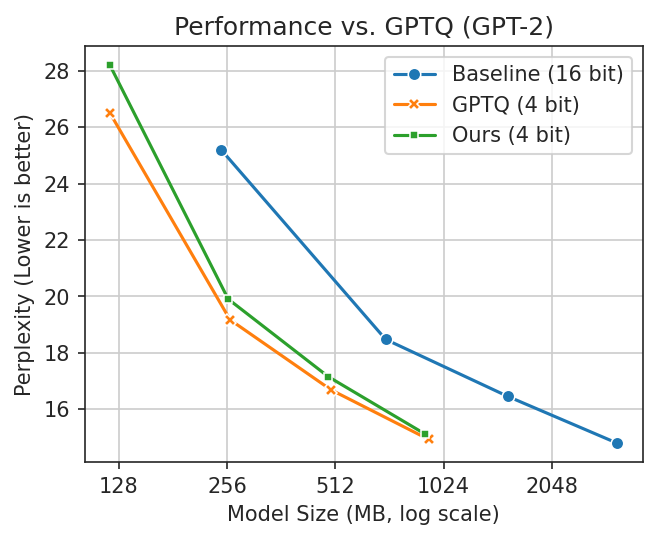
                When compared to standard 4 bit Apple Silicon-compatible methods, it produces consistently more accurate
                results. Additionally it approaches the accuracy of GPTQ, a widely-used method that is not compatible.
            </p>

            <p>
                Finally, this method is comparatively accessible. Access to Colab free tier and an Apple Silicon MacBook
                is sufficient to quantize the full family of GPT-2 models up to 1.5B parameters.
            </p>

            <img class="block-center" style="max-width: calc(min(100%, 380px)); border-radius: 4px 4px 0 0"
                src="/static/blog/llm-quantization-for-iphone/whole-tensor-comparison.png" />
            <img class="block-center" style="max-width: calc(min(100%, 380px)); border-radius: 0 0 4px 4px"
                src="/static/blog/llm-quantization-for-iphone/gptq-comparison.png" />
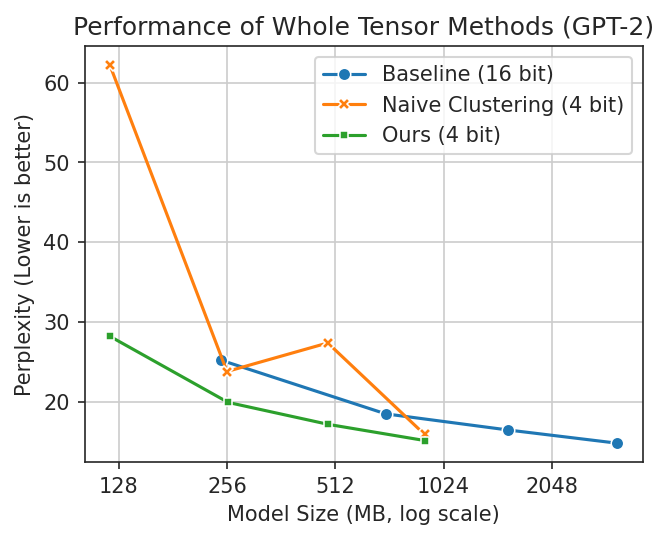
            <sub class="block-center image-caption" style="text-align: center;">Lower is better in these plots. You want
                a
                smaller model with better performance (lower perplexity is better). In the first plot, naive clustering
                occasionally performs well but is erratic. In the second, GPTQ is better but cannot run fully on Apple
                Silicon.</sub>

            <h2>Acknowledgements</h2>
            <p>
                This method extends <a href="https://arxiv.org/abs/2306.07629">SqueezeLLM</a>, and remixes ideas from both
                <a href="https://arxiv.org/abs/2211.10438">SmoothQuant</a> and <a
                    href="https://arxiv.org/abs/2306.00978">AWQ</a>. It was developed
                concurrently with <a href="https://arxiv.org/abs/2402.11295">OneBit</a>, and shares some similar ideas.
                Thank you for sharing your research and code!
            </p>

            <h2 id="primer">LLM and Quantization Primer</h2>
            <div class="inline-aside">If you know this, you can skip it. If you don't, hopefully it helps you get
                oriented. Drop me a line if anything is confusing!</div>

            <p>
                When you ask an LLM a question, that text gets transformed into a matrix of numbers. This matrix is then
                transformed repeatedly with a bunch of math until a final transformation that converts it from numbers to
                the first few characters of the LLM's response.
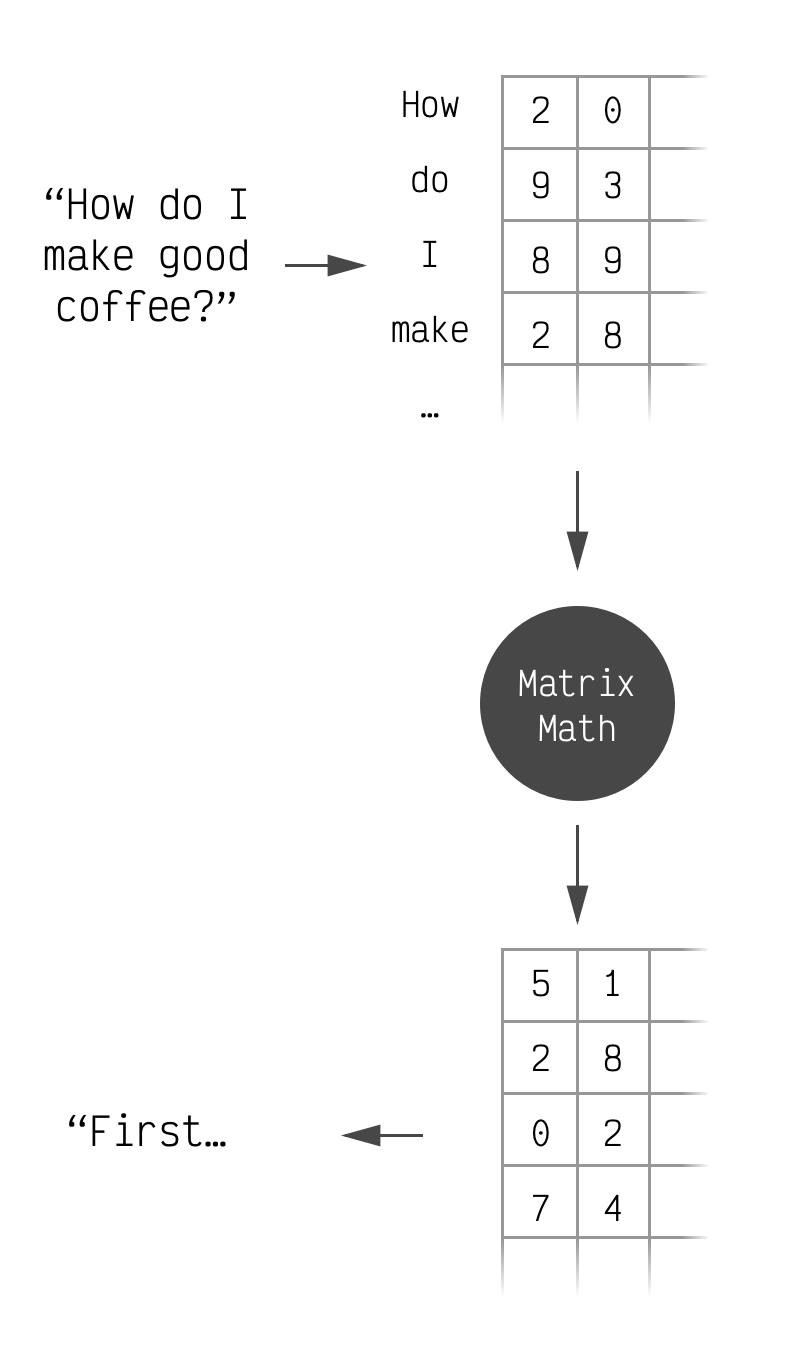
            </p>

            <img src="/static/blog/llm-quantization-for-iphone/llm-simplified.png" class="block-center"
                style="max-width: calc(min(100%, 380px))" />
            <sub class="block-center image-caption" style="text-align: center;">This is accurate for our purposes.</sub>

            <p>
                Within these repeated transformations there are many times where the input matrix is multiplied with
                different hardcoded matrices. These hardcoded matrices can be quite large and end up accounting for most of
                the space that an LLM takes up. For instance LLaMa 7B, Facebook's open-source LLM, is 13.5GB and 12.9GB of
                that is the numbers that make up these large matrices.
            </p>

            <p>
                Typically the matrix's values are stored as 16 bit <sup class="sup-aside">2 byte</sup> or 32 bit <sup
                    class="sup-aside">4 byte</sup>
                floating point numbers. For LLaMa a typical matrix is 4096x4096 which means it takes 33MB on its own.
                Shrinking those 16 bit elements to 4 bits brings the size of that matrix to 8.3MB. Doing the same for every
                matrix brings the whole model from 13.5GB to just under 4GB.
            </p>

            <p>
                Instead of measuring this compression in bytes-per-matrix, it is measured in bits-per-element. (1 byte = 8
                bits). This makes it easier to compare across matrices of different sizes and also gives us some flexibility
                to store a few extra values alongside our matrix. This is actually fairly common. Including them in the
                bits-per-element calculation makes for fair comparisons.
            </p>

            <p>
                So, in summary, LLMs do a bunch of math with matrices in order to generate replies. These matrices are big
                and quantization's goal is to make them smaller without losing the LLM's ability to reply. This shrinks the
                model and lets us run it on less powerful devices, like your phone.
            </p>

            <h2>Challenges with Apple Silicon</h2>
            <p>
                If you take the weight from a linear layer (one of the matrices we talked about above) out of an LLM and
                look at the distribution of its elements, you will generally see a bell curve.
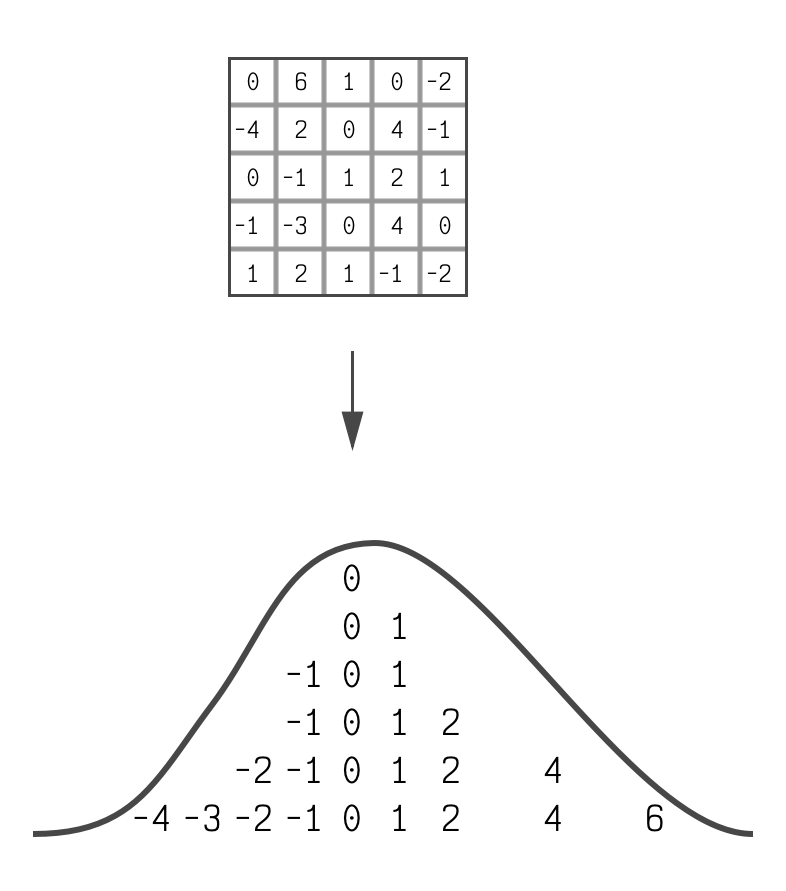
            </p>

            <img src="/static/blog/llm-quantization-for-iphone/weight-distribution.png" class="block-center"
                style="max-width: calc(min(100%, 380px))" />
            <sub class="block-center image-caption" style="text-align: center;">It's not a perfect bell curve, but it's
                close enough to be useful.</sub>

            <p>
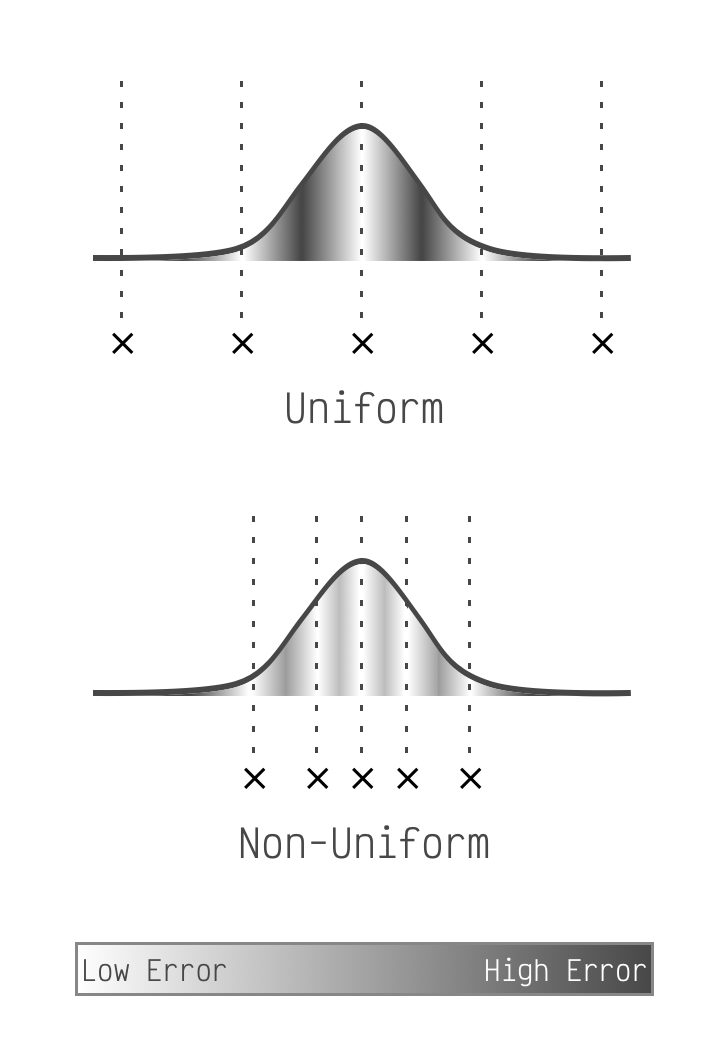
                Nearly all recent quantization schemes are uniform which means they take this bell curve and pick two values
                for it. They pick a starting point and also a step size which they then use to place equally-spaced points
                along the x-axis. To actually quantize the matrix they simply snap all matrix elements to the nearest point.
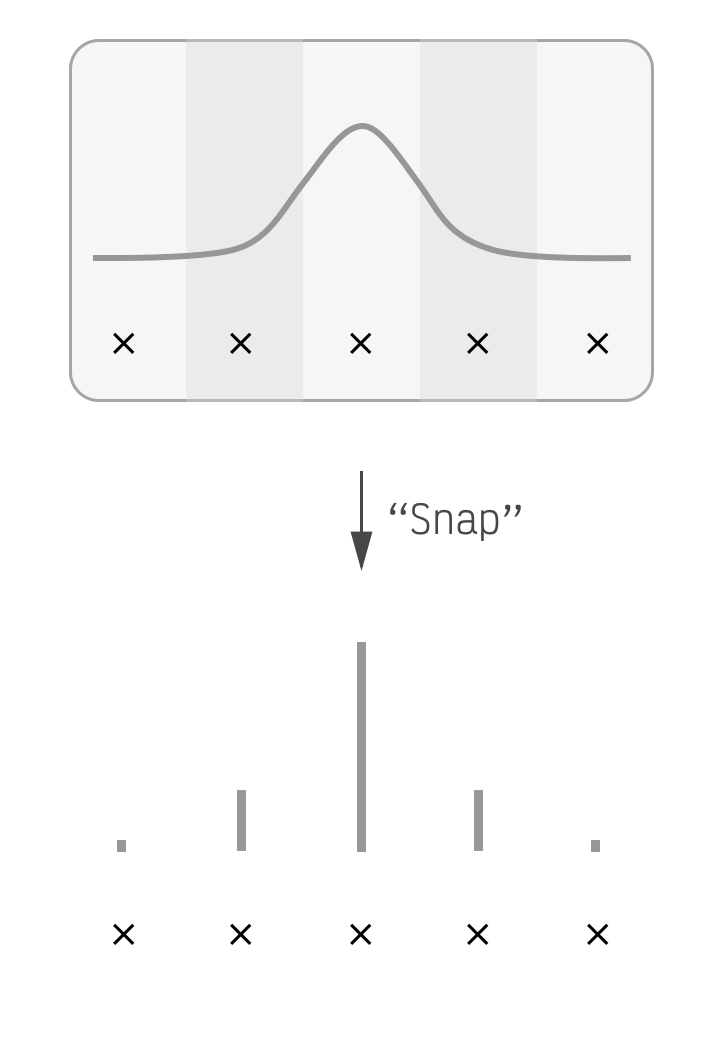
            </p>

            <img src="/static/blog/llm-quantization-for-iphone/quantize-snap.png" class="block-center"
                style="max-width: calc(min(100%, 380px))" />
            <sub class="block-center image-caption" style="text-align: center;">The x points are equally
                spaced.</sub>

            <p>
                This is a non-optimal use of space in our quantized linear layer. The points on the edges of the bell curve
                barely capture any matrix elements, but they consume the same amount of space in the LLM as points in the
                middle which represent many. They are simply not an effective use of bits. (This is fast on GPUs though
                which is why everyone uses them.)
            <p>
                A common solution for this is to break up the matrix into chunks of either rows, columns, or groups. Having
                fewer elements in a chunk tends to make quantization more accurate by narrowing the bell curve (more or
                less) and it only costs a few extra fractions of a bit on average. This sufficiently minimizes the
                awkwardness of fitting equally-spaced points to bell curve-distributed matrix elements.
            </p>

            <p>
                Unfortunately Apple Silicon does not support this chunking concept for low (&lt;8) bit quantization.
                However it makes up for it by allowing models that use a non-uniform quantization scheme. On our bell curve
                from before, this means we can place our points anywhere we want. So we'll place them optimally.
            </p>

            <p>
                What is optimal? For each matrix element we calculate how far it is from the nearest point. This is the
                element's quantization error. We place our points along the bell curve so that the sum of all elements'
                errors is as low as possible. (<a href="https://en.wikipedia.org/wiki/K-means_clustering">k-means
                    clustering</a> is a good way to do this.)
            </p>

            <img src="/static/blog/llm-quantization-for-iphone/uniform-vs-non-uniform.png" class="block-center"
                style="max-width: calc(min(100%, 380px))" />
            <sub class="block-center image-caption" style="text-align: center;">Notice how uniform puts points at the edges,
                but non-uniform is free to ignore the small number of matrix elements there.</sub>

            <p>
                Placing the points optimally like this is all we need to do when we have a lot of points to place. Most LLMs
                will perform very well if we place 6 bits or 8 bits worth of points (64 and 256 respectively). However when
                we drop to 4 bits worth, which is only 16 points, this simple optimal placement is not enough.
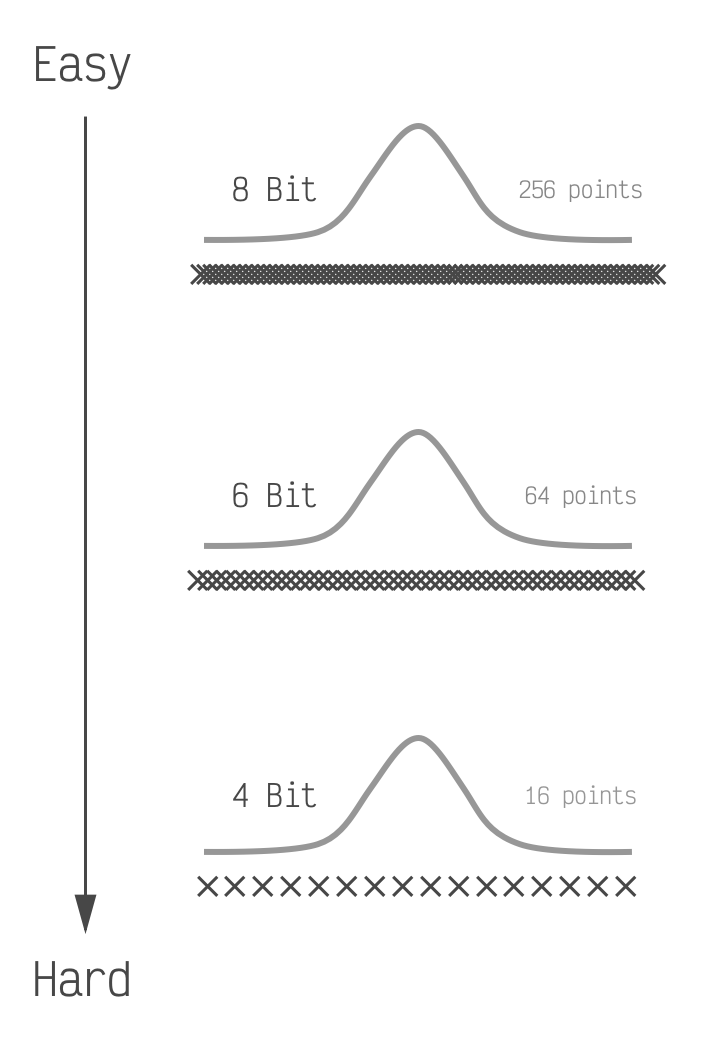
            </p>

            <img src="/static/blog/llm-quantization-for-iphone/bits-to-point-density.png" class="block-center"
                style="max-width: calc(min(100%, 380px))" />
            <sub class="block-center image-caption" style="text-align: center;">If we were to shade these to show the error
                they would get darker going from top to bottom. The LLM performance also typically goes from nearly perfect,
                to good, to bad going from top to bottom.</sub>

            <h2>Method Overview</h2>
            <p>
                Our goal is to improve LLM performance when using 4-bits as much as possible. We achieve this by making 3
                complementary modifications to the quantization process and the LLM itself.
            </p>

            <h3>Modification 1: Weighting by Importance</h3>

            <p>
                The first modification comes directly from another paper, <a
                    href="https://arxiv.org/abs/2306.07629">SqueezeLLM</a>. The paper is fairly approachable, but
                we'll summarize the parts we're using.
            </p>

            <p>
                It turns out that every element in these matrices is not equally important. In fact the top few percent are
                significantly more important. When we're placing our points optimally we should not treat every element
                equally, but let the more important elements have more sway. But how do we know what's important? We take a
                small number of input texts (100 is enough), send them through our LLM, and observe the impact each matrix
                element had on the LLM's response. The higher the total impact, the more important.
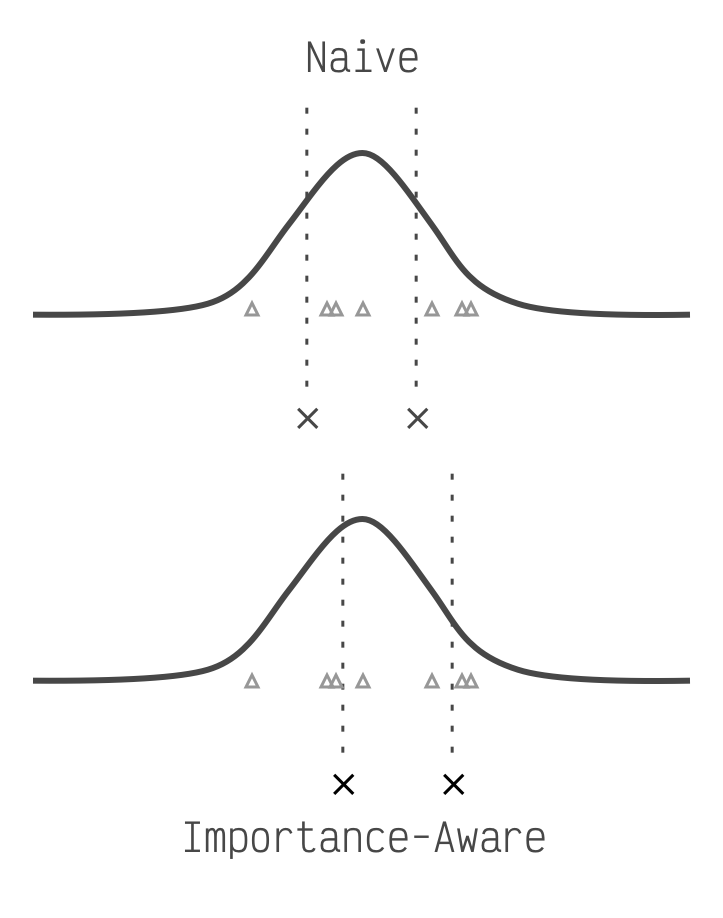
            </p>

            <img src="/static/blog/llm-quantization-for-iphone/non-uniform-sensitivity.png" class="block-center"
                style="max-width: calc(min(100%, 380px))" />
            <sub class="block-center image-caption" style="text-align: center;">The triangles represent more important
                elements. The Naive method is optimal for a standard bell curve, but the importance aware method shifts
                closer to the triangles.
            </sub>

            <h3>Modification 2: Scaling for Easier Clustering</h3>

            <p>
                So far we've been looking at our matrix as a single bell curve. A different way of thinking about it is to
                look at every column of the matrix as an independent entity that just happens to be joined together in this
                matrix. Similar to the matrix as a whole, each column's elements are roughly bell curve-shaped. Most of the
                bell curves have similar centers but they all have different standard deviations (how wide or narrow they
                are).
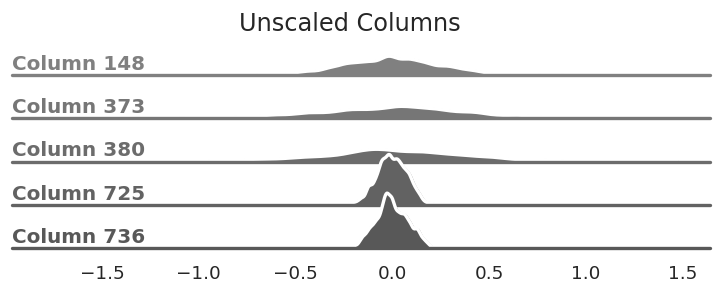
            </p>

            <img src="/static/blog/llm-quantization-for-iphone/unscaled-weight-columns.png" class="block-center"
                style="max-width: calc(min(100%, 380px))" />
            <sub class="block-center image-caption" style="text-align: center;">The columns of our matrix are all centered
                around zero, but the standard deviation varies&mdash;some are very wide while others are fairly
                narrow.
            </sub>

            <p>
                If we divide the elements of each column by the column's standard deviation we make the bell curves roughly
                the same shape. This makes it easier to place our points since it prevents one column from having undue
                influence over the rest. (You can also think of it as squishing more elements towards the middle of the
                curve where we typically place more points.)
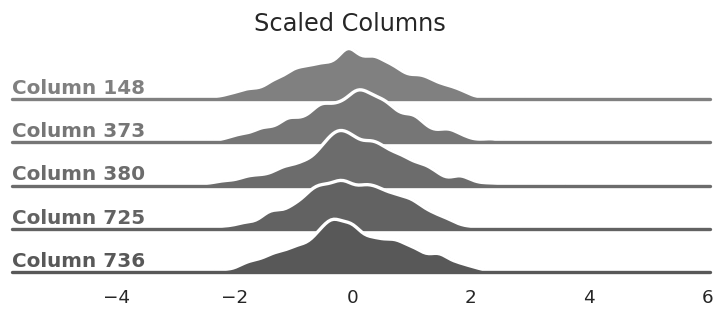
            </p>

            <img src="/static/blog/llm-quantization-for-iphone/scaled-weight-columns.png" class="block-center"
                style="max-width: calc(min(100%, 380px))" />
            <sub class="block-center image-caption" style="text-align: center;">The same columns from above after dividing
                every element by each column's standard deviation. This reshapes the bell curves.</sub>

            <p>
                It's important that we don't change the output of our LLM, and scaling each column independently changes it.
                So we need to take the per-column values that we divided by and correct for them somewhere else in our
                model. All of the matrices that we're quantizing are used in matrix multiplications. Since we divide each
                column, and columns determine the output of the matrix multiplication, we can add a step in our LLM after
                the multiplication to re-multiply the removed values back in.
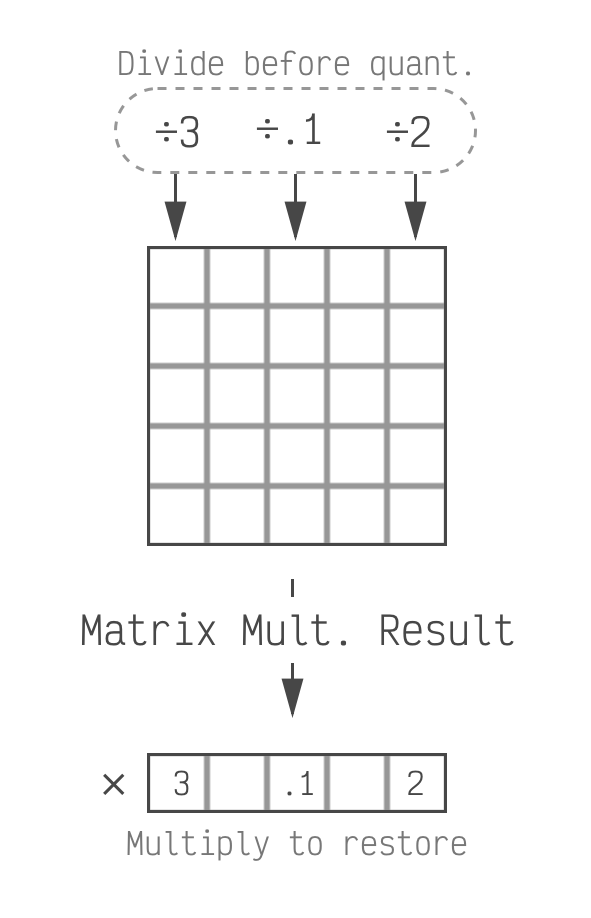
            </p>

            <img src="/static/blog/llm-quantization-for-iphone/scale-factor-restore.png" class="block-center"
                style="max-width: calc(min(100%, 380px))" />
            <sub class="block-center image-caption" style="text-align: center;">We divide before quantizing which makes
                quantization easier. We have to restore the scale factors at inference time, when the model is generating a
                response.</sub>

            <p>
                This does mean we have to keep a few extra values as 16 bit (the ones we multiply back in). For a 768x768
                matrix, we need 768 extra values in 16 bits. This puts us at 4.02 bits on average which is a reasonable
                trade-off. The average number of bits decreases as the model and matrices get larger which makes this even
                less of a concern. (LLaMa is 4.003 or less depending on the version.)
            </p>

            <h3>Modification 3: Shifting the Other Matrix</h3>

            <p>
                So far we've been looking closely at the matrix itself. Let's now look at how it is used. As mentioned
                above, these matrices are used for matrix multiplication. Specifically the model is performing matrix X
                times matrix W, <code>X*W</code>, and we are quantizing W. We've talked about how the elements in W are
                nicely distributed with an average close to zero and bell-shaped. This is not true for X. X depends on the
                text
                that the model received as input and can vary significantly in how its elements are distributed.
            </p>

            <p>
                Why does this matter? Imagine a simple product of two numbers: <code>x*w</code>. Let's say that in this
                case our 1 element matrix, w, has the value of 2.3 and we quantize it to 2. When we do <code>x*2</code> we
                get a quantization error of <code>x*0.3</code>. The closer that x is to zero, the less error. The farther
                it is from zero the more we get.
            </p>

            <p>
                This extrapolates to matrix multiplication. When we look at a column of matrix X, if most of its values are
                far from zero then the impact of quantization error for that column will be larger.
            </p>

            <p>
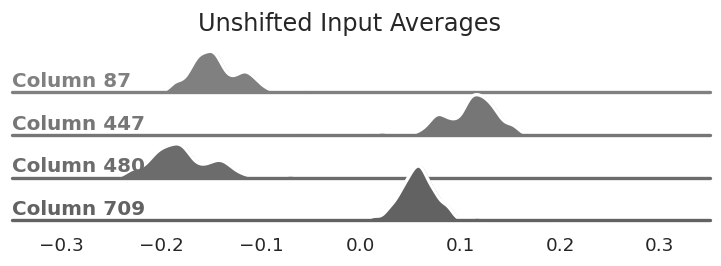
                Similar to our first modification, we can inspect a small number of texts as they flow through the LLM. If
                we do this we'll see that there is consistency in which columns of X, the input matrix, have larger or
                smaller values in general.
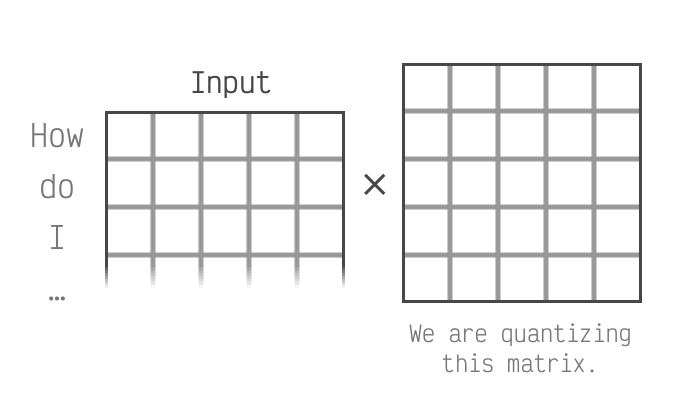
            </p>

            <img src="/static/blog/llm-quantization-for-iphone/input-column-highlight.png" class="block-center"
                style="max-width: calc(min(100%, 380px))" />
            <sub class="block-center image-caption" style="text-align: center;">We're focusing on the columns of the left
                matrix. This matrix is derived from the input to the LLM.</sub>

            <img src="/static/blog/llm-quantization-for-iphone/unshifted-activation-columns.png" class="block-center"
                style="max-width: calc(min(100%, 380px))" />
            <sub class="block-center image-caption" style="text-align: center;">The distribution of average values for
                select columns. Notice that they are not centered at zero unlike the matrix we're quantizing.</sub>

            <p>
                To minimize the impact of large values in X we can apply a per-input column shift. This will move most of
                the values in X closer to zero on average, thereby reducing the impact of our quantization error. We shift
                by subtracting the average of the values we saw for that column.
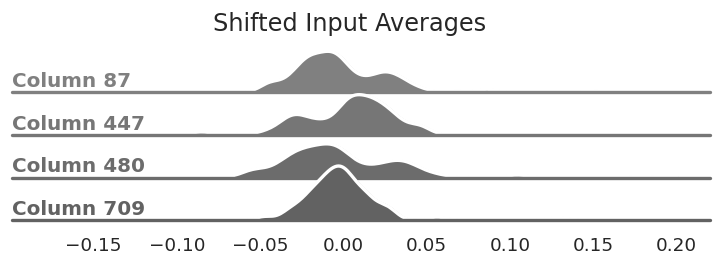
            </p>

            <img src="/static/blog/llm-quantization-for-iphone/shifted-activation-columns.png" class="block-center"
                style="max-width: calc(min(100%, 380px))" />
            <sub class="block-center image-caption" style="text-align: center;">The same columns from above after
                subtracting the average value from each column. They are now centered around zero.</sub>

            <p>
                Similar to our second modification, we need to reverse this change in the model in order to not change its
                outputs. This one is a little trickier, but again easier to think about without matrices involved. If we
                take our <code>x*w</code> from earlier we can make a new shifted input y (so, <code>y=x-shift</code>). Now
                the model will do <code>y*w</code> which is actually <code>(x-shift)*w</code>. If multiply that out we get
                <code>x*w - shift*w</code>. Since shift and w are both constants we just need to pre-compute that value and
                subtract it after the matrix multiplication in the model. This undoes the impact of shifting X but reduces
                the error when w is quantized. (Extrapolating this to matrices is a little harder, but still doable.)
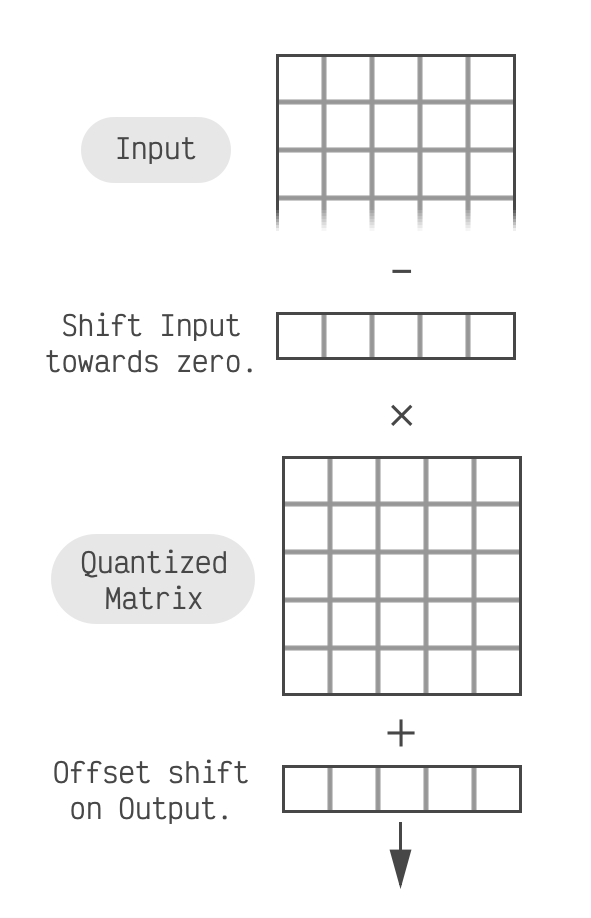
            </p>

            <img src="/static/blog/llm-quantization-for-iphone/shift-factor-restore.png" class="block-center"
                style="max-width: calc(min(100%, 380px))" />
            <sub class="block-center image-caption" style="text-align: center;">In this case we don't subtract the shift
                values themselves, but the result of multiplying all the shifts by the matrix we're quantizing.</sub>

            <p>
                Depending on the model this adds between zero and two additional vectors of 768 elements in 16 bits. At a
                worst case this brings us up to 4.06 bits total.
            </p>

            <h1>Results</h1>

            <p>
                Used individually, these modifications have varying efficacy. Generally the first modification, from
                SqueezeLLM, works well on its own. When we add in the other two modifications we see consistent improvement.
                This leaves us with a quantization scheme that is both more accurate and less erratic than the baseline
                4-bit method we wanted to improve upon.
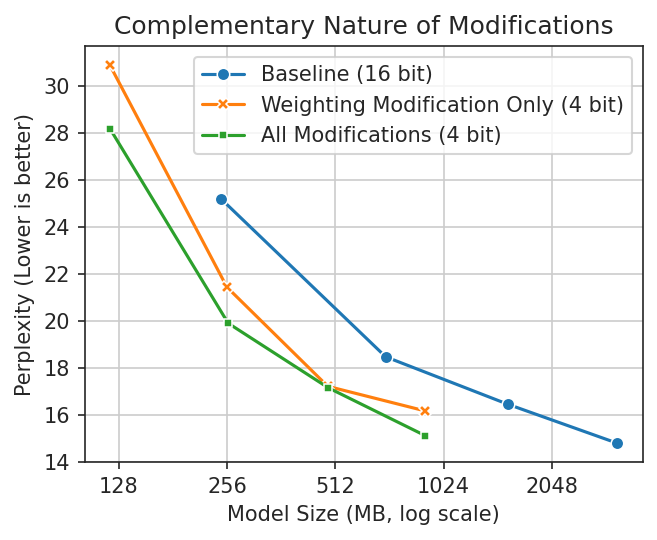
            </p>

            <img src="/static/blog/llm-quantization-for-iphone/additive-modifications.png" class="block-center"
                style="max-width: calc(min(100%, 380px))" />
            <sub class="block-center image-caption" style="text-align: center;">SqueezeLLM (Weighting) is surprisingly
                effective on its own, even at the whole-tensor level. Adding our other modifications consistently improves
                upon it. The improvement for gpt2-large is negligible&mdash;something interesting to follow up on.</sub>

            <h1>Conclusion</h1>
            <p class="inline-aside">
                <b>tl;dr</b> We used an amalgamation of existing and, I think, new ideas to quantize LLM linear
                layers to ~4 bits on average, dramatically shrinking model size. Since we do this at the tensor level
                without grouping, this method is fully compatible with Apple Silicon on iPhone or Mac which opens the door
                for larger models on your devices.
            </p>

            <p>
                Thanks for reading! To stay in the loop as I explore more, you can give me a follow on <a
                    href="https://twitter.com/flat">Twitter</a>. If you'd
                like to give it a go yourself, I've got a drop-in replacement for torch's Linear layer, as well as some
                instructions: <a href="https://github.com/smpanaro/apple-silicon-4bit-quant">here</a>. Please get in touch, ask questions, and let me know what you learn!
            </p>

            <hr />

            <h3>Appendix: Future Ideas</h3>
            <p>
                Part of my motivation for writing this is to find folks who are smarter than me, who can maybe check my work, and
                maybe even take it further. If that's you, do please reach out! There's a couple directions that I think
                still have more to give / would be interesting to explore:
            </p>

            <ul>
                <li>I couldn't find a way to scale the input channels (weight matrix rows) that was helpful. Seems like
                    there might be something there, either as a way to make clustering easier, or as a way to minimize error
                    from the inputs.</li>
                <li>Depending on the model, sometimes computing a weighted standard deviation based on the SqueezeLLM
                    sensitivities performs slightly better. This makes me think that standard deviation is close but not the
                    optimal solution.</li>
                <li>These models seem very reactive to how the SqueezeLLM sensitivities are generated. I suspect any
                    improvements there would help.</li>
                <li>Explore integrating this with Mixed Bit Precision methods.</li>
            </ul>

            <h3>Appendix: Modification Comparison</h3>
            <p>
                To further support that these modifications are complementary, wikitext perplexity was measured in all
                possible combinations. As mentioned above, gpt2-large is an outlier but the differences are minor. The
                SqueezeLLM fisher information (sensitivities) were computed using C4 in all cases.
            </p>

            <div style="overflow: auto;">
                <table class="results-table">
                    <tr>
                        <th>Model</th>
                        <th>Weighting</th>
                        <th>Scaling</th>
                        <th>Shifting</th>
                        <th>Weight+Scale</th>
                        <th>Weight+Shift</th>
                        <th>Scale+Shift</th>
                        <th>Weight+Scale+Shift</th>
                    </tr>
                    <tr>
                        <td>gpt2</td>
                        <td>30.8947</td>
                        <td>43.0891</td>
                        <td>44.9285</td>
                        <td>28.8972</td>
                        <td>29.1401</td>
                        <td>43.5065</td>
                        <td>28.1946</td>
                    </tr>
                    <tr>
                        <td>gpt2-medium</td>
                        <td>21.4389</td>
                        <td>30.9959</td>
                        <td>23.8464</td>
                        <td>20.4853</td>
                        <td>19.8515</td>
                        <td>23.6801</td>
                        <td>19.904</td>
                    </tr>
                    <tr>
                        <td>gpt2-large</td>
                        <td>17.2172</td>
                        <td>22.5075</td>
                        <td>18.1454</td>
                        <td>17.1246</td>
                        <td>17.1282</td>
                        <td>25.2589</td>
                        <td>17.1507</td>
                    </tr>
                    <tr>
                        <td>gpt2-xl</td>
                        <td>16.1751</td>
                        <td>15.89</td>
                        <td>15.7223</td>
                        <td>15.148</td>
                        <td>16.0874</td>
                        <td>17.0936</td>
                        <td>15.1148</td>
                    </tr>
                </table>
                <table class="results-table">
                    <tr>
                        <th>Model</th>
                        <th>float16</th>
                        <th>naive 4-bit</th>
                        <th>Weight+Scale+Shift</th>
                        <th>GPTQ</th>
                    </tr>
                    <tr>
                        <td>gpt2</td>
                        <td>25.1876</td>
                        <td>62.1889</td>
                        <td>28.1946</td>
                        <td>26.5</td>
                    </tr>
                    <tr>
                        <td>gpt2-medium</td>
                        <td>18.4739</td>
                        <td>23.7826</td>
                        <td>19.904</td>
                        <td>19.1719</td>
                    </tr>
                    <tr>
                        <td>gpt2-large</td>
                        <td>16.4541</td>
                        <td>27.3636</td>
                        <td>17.1507</td>
                        <td>16.6875</td>
                    </tr>
                    <tr>
                        <td>gpt2-xl</td>
                        <td>14.7951</td>
                        <td>15.89</td>
                        <td>15.1148</td>
                        <td>14.9297</td>
                    </tr>
                </table>
            </div>
            ]]>
        </content>
    </entry>
    <entry>
        <title type="text">Inside Apple's 2023 Transformer Models</title>
        <link rel="alternate" type="text/html"
            href="https://www.stephenpanaro.com/blog/inside-apples-2023-transformers" />
        <id>tag:stephenpanaro.com,2023-11-16:/blog/inside-apples-2023-transformers</id>
        <updated>2023-11-16T12:00:00Z</updated>
        <published>2023-11-16T12:00:00Z</published>
        <author>
            <name>Stephen Panaro</name>
        </author>
        <content type="html" xml:lang="en">
            <![CDATA[

        <span class="subhead">What can we learn from them?</span>
        <p>Apple's latest OSes include several transformer models that are optimized for the Apple Neural Engine. We'll
            take a look at how they're implemented and see if there's anything we can apply to our own models. To make
            that easier, I've cobbled together support for viewing them in Netron&mdash;you can try it yourself <a
                href="https://github.com/smpanaro/netron/tree/espresso-mil">here</a>.</p>
        <hr />
        <p>While everyone is talking about AI or GPT, Apple made a point to use the words "machine learning" and
            "transformer" when announcing new features for this year's operating systems (iOS 17 and macOS Sonoma).</p>
        <p>Apple has been vocal about their Machine Learning accelerator, the Neural Engine (ANE), so it's no surprise
            that these models are designed to leverage its capabilities.</p>
        <p>In contrast to their normal secrecy, Apple has been fairly public about how to run the transformer model
            architecture on the ANE. In the past year and a half they:</p>
        <ul>
            <li>Wrote a <a href="https://machinelearning.apple.com/research/neural-engine-transformers">research
                    article</a> about how to optimize transformers for the ANE.<ul>
                    <li>Released code to demonstrate it in the <a
                            href="https://github.com/apple/ml-ane-transformers">ml-ane-transformers repo</a>.</li>
                </ul>
            </li>
            <li>Published a Stable Diffusion (text to image) implementation optimized for the ANE in the <a
                    href="https://github.com/apple/ml-stable-diffusion">ml-stable-diffusion repo</a>.<ul>
                    <li>They have kept this up to date too!</li>
                </ul>
            </li>
        </ul>
        <p>The models embedded in the new OS are not quite as easily inspected as a research article or GitHub project.
            However they are a year newer. Let's see what we can learn from them!</p>
        <blockquote>
            <p>This is most interesting if you're familiar with transformers and how they work. However if you are just
                generally curious I've tried to add explainers throughout to fill in some background.
            <details>
                <summary>They'll look like this.</summary>Feel free to skip them.
            </details>
            </p>
        </blockquote>
        <h2 id="themodels">The Models</h2>
        <p>We'll look at two models today. One powers the keyboard autocomplete, and the other does speech to text. Both
            use the transformer architecture to a degree.</p>
        <p>
        <details>
            <summary>What is a transformer?</summary>
            Transformer is an ML model architecture. This is a specific sequence of mathematical operations that the
            model performs to generate a set of numeric outputs from a given set of inputs. Transformers are
            particularly good at generating text since they predict new words based on all the prior words. They can
            also be used for non-text problems too.
        </details>
        </p>
        <p><img src="https://www.stephenpanaro.com/static/blog/inside-apples-2023-transformers/autocomplete-overview.png"
                alt="annotated image of Netron showing the first layer of the autocomplete transformer model">
            <sub class="block-center image-caption" style="text-align: center;">The input and first layer of the
                autocomplete model, annotated.</sub>
        </p>
        <p>We won't go too deep into the models individually, rather just highlight the interesting bits.</p>
        <h2 id="thevocabsize">The Vocab Size</h2>
        <p><strong>Model:</strong> Keyboard Autocomplete</p>
        <p>The outputs of a transformer are a bunch of probabilities for which token out of the vocab should come next.
            To compute these, you need to load a large mapping from token ID to embedding vector into memory.</p>
        <p>
        <details>
            <summary>Vocab? Probabilities?</summary>
            Transformers operate on numbers, so we need a way to translate between text and numbers. We do this by
            generating a set of pieces of words (and some whole words). Each word piece (aka token) is assigned a
            number, the token ID, that represents it. The group of all word pieces is the vocabulary. The outputs of a
            text generation model is a probability for every token in the vocabulary that is the likelihood it is the
            next token in the sequence.
        </details>
        </p>
        <p>One dimension of this mapping matrix is equal to the number of tokens in the vocabulary. For many models this
            is quite large. gpt-2 (2019) has 50,257 tokens in its vocabulary. LLaMa and Llama2 (2023) have 32,000.</p>
        <p>Apple's autocomplete model only has 15,000. Not only is this number smaller, it is also just underneath the
            Neural Engine's threshold for tensor size. This means that the final computation to determine probabilities
            can happen on the Neural Engine instead of paying the cost to transfer to CPU.</p>
        <p><img src="https://www.stephenpanaro.com/static/blog/inside-apples-2023-transformers/output-logits.png"
                alt="annotated Netron screenshot showing the autocomplete models outputs and indicating that the last inner_product can run on the ANE">
            <sub class="block-center image-caption" style="text-align: center;">The inner_product here is the language
                modeling (lm) head.</sub>
        </p>
        <p><strong>Lesson:</strong> If possible, keep your vocab under 16384. <sup>[1]<sup></p>
        <p><sub>[1] If you don't have control of this, you can duplicate the embedding matrix and do most of the
                computation on ANE. <a
                    href="https://github.com/RobertRiachi/ANE-Optimized-Whisper-OpenAI/blob/d42252155b8e29b2e2c32e7b911ec647198547fb/model.py#L181-L183">Here's
                    an example</a>.</sub></p>
        <h2 id="thekvcache">The KV Cache</h2>
        <p><strong>Model:</strong> Speech to Text</p>
        <p>When using transformers for text generation, a common way to speed them up is to use KV caching. This saves
            you a decent amount of computation.</p>
        <p>
        <details>
            <summary>What is KV Caching?</summary>
            A central part of the transformer architecture is multiplying 3 matrices together. They are the Query, Key
            and Value matrices. An interesting aspect about repeatedly generating text with transformers is that the
            contents of these matrices is mostly the same from prediction to prediction. This means we can avoid a bunch
            of computation by reusing the K and V matrices from the last token we predicted. These are the KV cache.
        </details>
        </p>
        <p><img src="https://www.stephenpanaro.com/static/blog/inside-apples-2023-transformers/traditional-kv-cache.png"
                alt="visualization of the Q and K multiplication without a cache and with a traditional single-token-Q cache">
            <sub class="block-center image-caption" style="text-align: center;">An example of how the Key (K) cache is
                used. With traditional KV caching, the input is 1 token and the cache is the size of all past
                tokens.</sub>
        </p>
        <p>In most implementations, the size of the KV cache increments for each new token. The ANE requires that a
            model's inputs and outputs are a fixed size<sup>*</sup>, which means a traditional KV cache is off the
            table.
            <br /><sub>*not strictly true, but practically</sub>
        </p>
        <p>You can use KV caching for any transformer model, not just text generation, and it seems that Apple has found
            a way to make it work for their speech-to-text model.</p>
        <p>They have side-stepped the ANE constraints by using a fixed size input for their new tokens and sliding their
            KV cache by that same amount for each inference.</p>
        <p><img src="https://www.stephenpanaro.com/static/blog/inside-apples-2023-transformers/apple-kv-cache.png"
                alt="visualization of two back-to-back inferences using Apple's sliding KV cache">
            <sub class="block-center image-caption" style="text-align: center;">Apple's KV cache slides so that the
                inputs are always the same size. In this example there are always 2 input tokens and cache that encodes
                3 tokens. This gives an effective sequence length of 5.</sub>
        </p>
        <p>This gives a meaningful speed up (2-5x in my experience). However there are two caveats.</p>
        <p>First, you have to use <a
                href="https://developer.apple.com/documentation/coreml/mlmultiarray/3882834-initwithpixelbuffer?language=objc">IOSurface-backed</a>
            inputs and outputs otherwise all of the speed gained is lost again by time spent copying them in and out of
            CoreML. Second, if you are on Sonoma/iOS17, you can't have any CPU segments at the start of your model or it
            will be really slow&mdash;this seems like a regression so I have filed feedback.</p>
        <p><strong>Lesson:</strong> Use KV caching. If you're on Sonoma/iOS17, do your CPU work in a separate model.</p>
        <h3 id="bonusthekeycache">Bonus: The Key Cache</h3>
        <p>The KV cache is actually a concatenation of caches for two different tensors: a Key (K) and Value (V). Often
            these are combined into one cache for simplicity, but Apple keeps them separate.</p>
        <p>Why keep them separate? First, you can store the Key cache transposed instead of transposing it before using
            it. Transposing large tensors is extra work that you can avoid (this is in line with Apple's principle of
            "minimize memory copies"). Secondly, the KV cache is a large tensor and by separating it into two, you keep
            the intermediate tensors smaller.</p>
        <p><img src="https://www.stephenpanaro.com/static/blog/inside-apples-2023-transformers/transposed-key-cache.png"
                alt="screenshot of netron showing separate K and V caches, and that the K cache is transposed">
            <sub class="block-center image-caption" style="text-align: center;">Separate caches for K and V and K is
                transposed.</sub>
        </p>
        <p>I don't see much impact from this, but it makes sense to me since you are avoiding work.</p>
        <p><strong>Lesson:</strong> Maybe transpose your K cache and keep it separate from the V cache.</p>
        <h2 id="customlayernorm">Custom Layer Norm</h2>
        <p><strong>Model:</strong> Both</p>
        <p>
        <details>
            <summary>What is a layer norm?</summary>
            Layer Norm is one of the operations that a transformer model uses. It scales the values of a tensor so they
            have certain statistical properties. Layer norm does this along a particular axis of the tensor.
        </details>
        </p>
        <p>One of the optimizations Apple recommends for the Neural Engine is to use a layer norm that normalizes along
            an uncommonly used axis. PyTorch's layer norm doesn't support this, so Apple provides a multi-step manual
            implementation.</p>
        <p>
        <details>
            <summary>Why does it matter what PyTorch supports?</summary>
            In order to run models on Apple's devices, they need to be converted to CoreML. The easiest way to convert
            them is by starting from a PyTorch (a Python ML framework) model. So if you want something, PyTorch needs to
            support it. <sup>There are other ways but they are more complex.</sup>
        </details>
        </p>
        <p>I was curious to see what Apple used for the layer norm for two reasons. First, on Ventura/iOS 16 I found
            that the layer_norm (specifically the reduce_mean) caused my models to lose precision in float16. Second,
            CoreML has native support for layer norm along the uncommon axis and I was curious if it would be used.</p>
        <p>Interestingly enough, it seems like Apple uses the same implementation that they open sourced in
            ml-ane-transformers. You can even see that most of the variable names line up!</p>
        <p><img src="https://www.stephenpanaro.com/static/blog/inside-apples-2023-transformers/layer-norm-comparison.png"
                alt="side-by-side of ml-ane-transformers layer_norm.py and netron of the layer norm with arrows pointing to the commonalities">
            <sub class="block-center image-caption" style="text-align: center;">Almost exactly the same! I am slightly
                confused by the alpha in the zero_mean though.</sub>
        </p>
        <p>I was hoping for something creative here, but on the plus side it seems that layer norm is more resilient in
            float16 on the new OSes.</p>
        <p><strong>Lesson:</strong> Just use Apple's custom layer norm.</p>
        <h2 id="quantization">Quantization</h2>
        <p><strong>Model:</strong> Both</p>
        <p>Both models use quantization to reduce the size of their weight parameters. Transformer models are often
            bottlenecked by the amount of weight parameters they have to load and then unload. The new OSes have support
            for runtime de-quantization which helps reduce this bottleneck.</p>
        <p>This can reduce the accuracy of your model, so keep an eye on that.</p>
        <p><strong>Lesson:</strong> Try quantizing your model. Two good sources: <a
                href="https://apple.github.io/coremltools/docs-guides/source/optimization-overview.html">coremltools
                docs</a> and this Huggingface/ml-stable-diffusion <a
                href="https://huggingface.co/blog/stable-diffusion-xl-coreml#what-is-mixed-bit-palettization">article</a>.
        </p>
        <h2 id="otherobservations">Other Observations</h2>
        <p>There are a couple other things I noticed but I don't know how to take advantage of them. Despite that, they
            are still interesting in and of themselves&mdash;if you see a way to use them, please let me know!</p>
        <p><strong>Single Input</strong> The text autocomplete model takes 3 inputs: 128 token IDs, 128 position values
            and 128 segment values. It passes them to the model as one concatenated input and then immediately splits
            them. I'm not sure the benefit of this, but it seems slightly odd so maybe there is one?</p>
        <p><img src="https://www.stephenpanaro.com/static/blog/inside-apples-2023-transformers/input-embeddings.png"
                alt="the input embeddings of the autocomplete model in netron" />
            <sub class="block-center image-caption" style="text-align: center;">In the autocomplete model, the 3
                embedding fields are passed as one input.</sub>
        </p>
        <p><strong>Shared Weights</strong> The text autocomplete model actually has two versions, one for CPU and one
            for ANE. They are slightly different (different inputs and outputs), but they both share the same weights. I
            don't believe this is currently possible using Apple's provided tooling, but it does open up some
            interesting possibilities. To achieve something similar today you have to ship two copies of the same
            weights.</p>
        <p><code>
$ head -n2 unilm_joint_ane.espresso.net
<br />
&lcub;
  "storage": "unilm_joint.espresso.weights",
<br />
$ head -n2 unilm_joint_cpu.espresso.net
<br />
&lcub;
  "storage": "unilm_joint.espresso.weights",
</code></p>
        <p><strong>MultiHead Softmax</strong> Apple's implementation of the transformer in ml-ane-transformers splits a
            large matrix multiplication up into several smaller ones, then performs a softmax on each result (<a
                href="https://github.com/apple/ml-ane-transformers/blob/da64000fa56cc85b0859bc17cb16a3d753b8304a/ane_transformers/reference/multihead_attention.py#L80-L108">here</a>).
            In contrast, the autocomplete model concatenates the results of the split matrix multiplications, performs
            one softmax, then re-splits that. I didn't see any performance difference from doing this, but I was only
            looking at speed.</p>
        <p><strong>Extra Outputs</strong> The CPU version of the autocomplete model outputs the next token logits, but
            also the pre-logit embeddings. This isn't super novel, but worth mentioning since the cost of getting
            already-existing data out of the model seems to be fairly low if you use IOSurface-backed buffers as
            mentioned above. This might be counterintuitive since some of these outputs can be rather large.</p>
        <h2 id="seeforyourself">See for Yourself</h2>
        <p>Those are the eight things that stood out to me from looking at Apple's new models. Four of them are useful,
            four of them are just interesting.</p>
        <p>If you'd like to look for yourself, you can find the models here on macOS Sonoma:</p>
        <ul>
            <li>Autocomplete: <code
                    class="long-code">/System/Library/LinguisticData/RequiredAssets_en.bundle/AssetData/en.lm/unilm.bundle</code>
            </li>
            <li>Speech to Text: <code
                    class="long-code">find /System/Library/AssetsV2/com_apple_MobileAsset_Trial_Siri_SiriUnderstandingAsrAssistant -name "AM-Conformer"</code>
            </li>
        </ul>
        <p>I have a hacky <a href="https://github.com/smpanaro/netron/tree/espresso-mil">fork</a> of Netron here that
            can open them (it will only open the first 3000 operations of the Speech to Text model since it is huge).
        </p>
        <p>If you find anything interesting or if I misinterpreted something I would love to know. Drop me a line!</p>
            ]]>
        </content>
    </entry>
    <entry>
        <title type="text">No Frills Time Series Compression That Also Works</title>
        <link rel="alternate" type="text/html"
            href="https://www.stephenpanaro.com/blog/time-series-compression" />
        <id>tag:stephenpanaro.com,2023-08-22:/blog/time-series-compression</id>
        <updated>2023-08-22T12:00:00Z</updated>
        <published>2023-08-22T12:00:00Z</published>
        <author>
            <name>Stephen Panaro</name>
        </author>
        <content type="html" xml:lang="en">
            <![CDATA[
            <span class="subhead">CSV + gzip will take you far.</span>

            <p>
                So you have some time series data and you want to make it smaller?
                You may not need an algorithm designed specifically for time series.
                Generic compressors like gzip work quite well and are much easier to
                use.
            </p>
            <p>
                Of course this depends on your data, so there’s some code you can
                use to try it out <a href="https://github.com/smpanaro/time-series-compression">here</a>.
            </p>

            <hr />

            <p>
                Recently I started working on a way to save Bluetooth scale data in
                my iOS coffee-brewing app. I want to allow people to record from a
                scale during their coffee-brewing sessions and then view it
                afterwards. Scale data is just a bunch of timestamps and weight
                values. Simple, yes, but it felt like something that might take a
                surprising amount of space to save. So I did some napkin math:
            </p>

            <div class="sequence">
                <code style="white-space: nowrap;">
                    1 scale session / day
                    <br />
                    10 minutes / session
                    <br />
                    10 readings / second
                    <br />
                    = 2.19M readings / year
                </code>
                <br />
                <code style="white-space: nowrap;">
                    1 reading = 1 date + 1 weight
                    <br />
                    = 1 uint64 + 1 float32
                    <br />
                    = 12 bytes
                    <br />
                    2.19M * 12B = 26 MB
                </code>
            </div>

            <p>
                26 MB per year is small by most measures. However in my case I keep
                a few extra copies of my app’s data around as backups so this is
                more like ~100MB/year. It’s also 40x the size of what I’m saving
                currently! This puts my app in danger of landing on the one Top Apps
                list I would not be stoked to be featured on:
            </p>


            <img class="block-center" src="https://www.stephenpanaro.com/static/blog/time-series-compression/icloud-settings.jpg"
                style="border-radius: 4px;" alt="iCloud storage usage in iOS Settings app" />
            <sub class="block-center image-caption" style="text-align: center;">iCloud storage usage</sub>

            <p>
                So let’s avoid that. At a high-level I see two options:
            </p>

            <p>
                <b>Save less.</b> 10 scale readings/second is probably more
                granularity than we’ll ever need. So we could just not save some of
                them. Of course if I’m wrong about that, they’re gone forever and
                then we’ll be out of luck.
            </p>

            <p>
                <b>Save smaller.</b> Looking at some example data, there are a lot
                of plateaus where the same value repeats over and over. That seems
                like it could compress well.
            </p>

            <img class="block-center" src="https://www.stephenpanaro.com/static/blog/time-series-compression/session-graph.jpg"
                style="border-radius: 10px;" alt="Example brewing session time series chart" />
            <sub class="block-center image-caption" style="text-align: center;">Example brewing session time series</sub>

            <h2>Picking Ways to Compress</h2>
            <p>
                This is my first rodeo with compression. I’m starting from basics
                like “compression makes big things small” and “double click to
                unzip”. Doing a little research seems like a good idea and it pays
                off.
            </p>

            <p>
                My scale data is technically “time series data” and it turns out we
                are not the first to want to compress it. There is a whole family
                of algorithms designed specifically for time series. This <a
                    href="https://www.timescale.com/blog/time-series-compression-algorithms-explained/">blog post</a>
                is a great deep dive, but for our purposes today we’ll be looking at
                two of the algorithms it mentions:
            </p>
            <ul>
                <li><i>simple-8b</i> which compresses sequences of integers</li>
                <li><i>Gorilla</i> which compresses both integers as well as floating point numbers</li>
            </ul>

            <p>
                Algorithms designed for exactly my problem space sound ideal.
                However something else catches my eye in a <a
                    href="https://news.ycombinator.com/item?id=31385515">comment</a> about the same
                blog post:
            </p>

            <blockquote>
                <div style="opacity: 0.5;">rklaehn on May 15, 2022</div>
                I have found that a very good approach is to apply some very simple
                transformations such as delta encoding of timestamps, and then
                letting a good standard compression algorithm such as zstd or
                deflate take care of the rest.
            </blockquote>

            <p>
                Using a general purpose algorithm is quite intriguing! One thing
                I’ve noticed is that there are no Swift implementations for
                simple-8b or Gorilla. This means I would have to wrap an existing
                implementation (a real hassle) or write a Swift one (risky, I would
                probably mess it up). General purpose algorithms are much more
                common and side-step both of those issues.
            </p>

            <p>
                So we’ll look at both. For simplicity I’ll call simple-8b and Gorilla the “specialist algorithms” and
                everything
                else “generalist”.
            </p>

            <h2>Evaluating the Specialist Algorithms</h2>
            <p>
                Starting with the specialists seems logical. I expect they will
                perform better which will give us a nice baseline for comparison.
                But first we need to smooth out a few wrinkles.
            </p>

            <h3>Precision</h3>

            <p>
                While wiring up an open-source simple-8b implementation I realize that
                it requires integers and both our timestamp and weight are floating
                point numbers. To solve this we’ll truncate to milliseconds and
                milligrams. A honey bee can flap its wings in 5 ms. A grain of salt is
                approximately 1mg. Both of these feel way more precise than necessary
                but better to err on that side anyways.
            </p>

            <div class="sequence">
                <code>
                    49.0335097 seconds
                    <br />
                    17.509999999999998 grams
                </code>
                <br />
                <code>
                    49033 milliseconds
                    <br />
                    17509 milligrams
                </code>
            </div>

            <p>
                We’ll use this level of precision for all our tests except Gorilla, which is designed for
                floating point
                numbers.
            </p>

            <h3>Negative Numbers</h3>
            <p>
                Negative numbers show up semi-frequently in scale data because often when
                you pick something up off a scale it will drop below zero.
            </p>

            <p>
                Unfortunately for us simple-8b doesn’t like negative numbers. Why?
                Let’s take a little detour and look at how computers store numbers.
                They end up as sequences of 1s and 0s like:
            </p>

            <code style="display: block; margin: 30px 0;">
                0000000000010110 is 22
                <br />
                0000000001111011 is 123
                <br />
                0000000101011110 is 350
            </code>

            <p>
                You’ll notice that these tend to have all their 1s all on the right.
                In fact, only very large numbers will have 1s on the left. simple-8b
                does something clever where it uses 4 of the leftmost spaces to
                store some 1s and 0s of its own. This is fine for us. We’re not
                storing huge numbers so those leftmost spaces will always be 0 in
                our data.
            </p>

            <p>
                Now let’s look at some negatives.
            </p>

            <code style="display: block; margin: 30px 0;">
                1111111111101010 is -22
                <br />
                1111111110000101 is -123
                <br />
                1111111010100010 is -350
            </code>

            <p>
                This is not great, the left half is all 1s! Simple-8b has no way of
                knowing whether the leftmost 1 is something it put there or
                something we put there so it will refuse to even try to compress
                these.
            </p>

            <p>
                One solution for this is something called ZigZag encoding. If you
                look at the first few positive numbers, normally they’ll look like
                this:
            </p>

            <code style="display: block; margin: 30px 0;">
                0000000000000001 is 1
                <br />
                0000000000000010 is 2
                <br />
                0000000000000011 is 3
                <br />
                0000000000000100 is 4
            </code>

            <p>
                ZigZag encoding interleaves the negative numbers in between so now
                these same 0/1 sequences take on a new meaning and zig zag between
                negative and positive:
            </p>

            <code style="white-space: pre-line; display: block; margin: 30px 0;">
                0000000000000001 is -1 <i>zig</i>
                0000000000000010 is &nbsp;1 <i>zag</i>
                0000000000000011 is -2 <i>zig</i>
                0000000000000100 is &nbsp;2 <i>zag</i>
            </code>

            <p>
                If we look at our negative numbers from earlier, we can see that
                this gets rid of our problematic left-side 1s.
            </p>

            <div style="overflow: auto;">
                <table>
                    <tr style="text-align: left; font-size: 14px;">
                        <th>#</th>
                        <th style="padding: 0 16px; border-left: 1px dashed;">Normal</th>
                        <th style="padding-left: 16px; border-left: 1px dashed;">
                            ZigZag
                        </th>
                    </tr>
                    <tr>
                        <td style="padding-right: 16px;">
                            <code>
                        -22
                        <br />
                        -123
                        <br />
                        -350
                        </code>
                        </td>
                        <td style="padding: 0 16px; border-left: 1px dashed;">
                            <code>
                        1111111111101010
                        <br />
                        1111111110000101
                        <br />
                        1111111010100010
                        </code>
                        </td>
                        <td style="padding-left: 16px; border-left: 1px dashed;">
                            <code>
                        <u>0000000000</u>101011
                        <br />
                        <u>00000000</u>11110101
                        <br />
                        <u>000000</u>1010111011
                        </code>
                        </td>
                    </tr>
                </table>
            </div>

            <p>
                We only need this for simple-8b, but it can be used with other
                integer encodings too. Kinda cool!
            </p>

            <h3>Pre-Compression</h3>
            <p>
                Technically we could run our tests now, but we’re going to do two
                more things to eke out a little extra shrinkage.
            </p>

            <p>
                First is delta encoding. The concept is simple: you replace each
                number in your data set with the difference (delta) from the
                previous value.
            </p>

            <div class="sequence">
                <code>
                    timestamp,mass
                    <br />
                    1691452800000,250
                    <br />
                    1691452800103,253
                    <br />
                    1691452800305,279
                    <br />
                    &hellip;
                    </code>
                <div class="sequence-rotate-90" style="padding: 0 32px; margin: auto 0; border: none;">
                    &rightarrow;
                </div>
                <code style="border: none; padding: 0;">
                    timestamp_delta,mass_delta
                    <br />
                    1691452800000,250
                    <br />
                    103,3
                    <br />
                    202,26
                    <br />
                    &hellip;
                </code>
            </div>

            <p>
                Visually these already look smaller. Amusingly enough they actually
                are smaller. We’ll use this for all algorithms except Gorilla which
                does delta encoding for us.
            </p>

            <p>
                The second tweak relates to the ordering of our data. So far we’ve
                been talking about time series as pairs of (timestamp, mass) points.
                Both specialist algorithms require us to provide a single list of
                numbers. We have two choices to flatten our pairs:
            </p>

            <code style="display: block; margin: 30px 0;">
                <b>Choice 1</b>: [first_timestamp, first_mass, second_timestamp, second_mass, &hellip;]
                <br />
                <b>Choice 2</b>: [first_timestamp, second_timestamp, … last_timestamp, first_mass, second_mass, &hellip;]
            </code>

            <p>
                Choice 2 compresses better on all algorithms (generalist too) even
                when we apply it after delta encoding. Again, Gorilla does its own
                thing–are you seeing the trend?
            </p>

            <h3>Specialist Results</h3>
            <p>
                We’ve truncated and pre-encoded, so let’s see some results.
            </p>

            <div style="overflow: auto;">
                <table class="results-table" style="margin-bottom: 20px;">
                    <thead>
                        <tr>
                            <th>Algorithm</th>
                            <th>Ratio 1</th>
                            <th>Ratio 2</th>
                            <th>Ratio 3</th>
                            <th>Avg. Ratio</th>
                            <th>Avg. MB/year</th>
                        </tr>
                    </thead>
                    <tr>
                        <td>simple-8b</td>
                        <td>6.92</td>
                        <td>5.4</td>
                        <td>7.18</td>
                        <td>6.5</td>
                        <td>4</td>
                    </tr>
                    <tr>
                        <td>gorilla</td>
                        <td>6.72</td>
                        <td>4.18</td>
                        <td>6.88</td>
                        <td>5.9</td>
                        <td>4.4</td>
                    </tr>
                    <tfoot>
                        <tr style="font-size: 12px; opacity: 0.6;">
                            <td></td>
                            <td colspan="4">
                                <div style="display: flex;">
                                    &RightTee; <span style="flex: 1; text-align: center;">higher is better</span>
                                    &LeftTee;
                                </div>
                            </td>
                            <td>
                                <div style="display: flex; line-height: 14px;">
                                    lower is better
                                </div>
                            </td>
                        </tr>
                    </tfoot>
                </table>
            </div>

            <p>
                I tested with three different types of scale recordings for a bit of
                variety, then backed out the MB/year from the average compression
                ratio. Going from 26 MB/year to under 5 is a great result!

            <h2>Now for the Generalist Ones</h2>
            <p>
                Similar to the specialist algorithms, we have a few
                choices to make before we can run our tests on the generalists.
            </p>

            <h3>Formatting</h3>

            <p>
                For simplicity we’re going to format our data as CSV. This might seem a little odd but it has a
                few perks:
            </p>
            <ul>
                <li>It’s human-readable which is nice for debugging.</li>
                <li>It’s also fairly compact as far as text representations go.</li>
                <li>Most languages have native libraries to make reading/writing CSVs easy. <sup
                        style="opacity: 0.6;">(alas,
                        Swift does
                        not)</sup></li>
            </ul>

            <p>
                We’ll use delta encoding like above–it’d be silly not to. We could
                really stretch the definition of CSV and stack all of the timestamps
                on top of all the masses into a single column, but that sacrifices a
                bit of readability so we won’t.
            </p>

            <h3>Picking Algorithms</h3>

            <p>
                There are a lot of general purpose compression algorithms. One
                popular benchmark lists over 70! We’re going to pick just 5. They
                are:
            </p>
            <ul>

                <li>
                    <i>zlib</i>, <i>LZMA</i>, and <i>LZFSE</i> – these come built-in with iOS which makes
                    my life easier. zlib and LZMA are also fairly common.
                </li>
                <li>
                    <i>Zstandard</i> (aka zstd) and <i>Brotli</i> – from Facebook and Google
                    respectively, both companies with an interest in good
                    compression
                </li>
            </ul>

            <h3>Picking Levels</h3>

            <p>
                We’ve narrowed it down from 70 to 5, but there’s another curveball.
                Unlike the specialist algorithms which have no configuration
                options, most generalist algorithms let you choose a level that
                trades off speed for better compression. You can compress fast or
                slow down to compress more.
            </p>

            <p>
                For simplicity (and so I don’t have to show you a table with 40+
                rows) we are not going to test all 11 Brotli levels or all 20+ zstd
                levels. Instead we’re going to choose levels that run at about the
                same speed. Apple makes this easier for us since LZFSE has no level
                and iOS only has zlib 5 and LZMA 6. All we have to do is pick levels
                for Brotli and zstd from this chart.
            </p>

            <img class="block-center" src="https://www.stephenpanaro.com/static/blog/time-series-compression/speed-chart.png" style="border-radius: 4px;"
                alt="Chart of speed benchmarks for our 5 algorithms at various levels" />
            <sub class="block-center image-caption" style="text-align: center;">Speed benchmarks for our 5
                algorithms</sub>

            <p>
                We’ll use Brotli 4 and zstd 5 since those are in-line with the
                fastest iOS algorithm. This means that zlib and LZMA are slightly
                advantaged but we’ll keep that in mind.
            </p>

            <h3>Generalist Results</h3>

            <p>
                We’ve prepped our CSV and made all our choices, so let’s see some results.
            </p>

            <div style="overflow: auto;">
                <table class="results-table">
                    <thead>
                        <tr>
                            <th>Algorithm</th>
                            <th>Ratio 1</th>
                            <th>Ratio 2</th>
                            <th>Ratio 3</th>
                            <th>Avg. Ratio</th>
                            <th>Avg. MB/year</th>
                        </tr>
                    </thead>
                    <tr>
                        <td>zlib 5</td>
                        <td>8.50</td>
                        <td>5.79</td>
                        <td>8.18</td>
                        <td>7.49</td>
                        <td>3.47</td>
                    </tr>
                    <tr>
                        <td>lzma 6</td>
                        <td>8.12</td>
                        <td>5.55</td>
                        <td>7.49</td>
                        <td>7.1</td>
                        <td>3.7</td>
                    </tr>
                    <tr>
                        <td>zstd 5</td>
                        <td>7.49</td>
                        <td>5.71</td>
                        <td>7.74</td>
                        <td>6.98</td>
                        <td>3.72</td>
                    </tr>
                    <tr>
                        <td>brotli 4</td>
                        <td>7.84</td>
                        <td>5.52</td>
                        <td>7.53</td>
                        <td>6.96</td>
                        <td>3.74</td>
                    </tr>
                    <tr>
                        <td>lzfse</td>
                        <td>7.49</td>
                        <td>5.36</td>
                        <td>7.12</td>
                        <td>6.7</td>
                        <td>3.8</td>
                    </tr>
                    <tfoot>
                        <tr style="font-size: 12px; opacity: 0.6;">
                            <td></td>
                            <td colspan="4">
                                <div style="display: flex;">
                                    &RightTee; <span style="flex: 1; text-align: center;">higher is better</span>
                                    &LeftTee;
                                </div>
                            </td>
                            <td>
                                <div style="display: flex; line-height: 14px;">
                                    lower is better
                                </div>
                            </td>
                        </tr>
                    </tfoot>
                </table>
            </div>

            <!--
                Split CSV
                algorithm
                ratio1
                ratio2
                ratio3
                avg
                Avg MB/year
                zlib 5
                9.61
                6.56
                8.98
                8.38
                3.1
                lzma 6
                9.31
                6.31
                8.40
                8
                3.25
                zstd 5
                10.70
                6.95
                9.61
                9.09
                2.86
                brotli 4
                10.47
                6.87
                9.57
                8.97
                2.9
                lzfse
                8.80
                6.05
                8.18
                7.67
                3.39
                -->


            <p>

                Wow! Everything is under 4MB. Coming from 26MB this is fantastic.
            </p>

            <h2>Specialist v. Generalist</h2>

            <p>
                I’ve plotted everything side-by-side:
            </p>

            <img class="block-center" src="https://www.stephenpanaro.com/static/blog/time-series-compression/compression-chart-2.png"
                style="border-radius: 4px;" alt="Chart of MB/year by algorithm" />
            <sub class="block-center image-caption" style="text-align: center;">MB/year by algorithm</sub>

            <p>
                Weirdly, the generalist algorithms universally beat the specialists.
                On top of that, you’ll recall we picked generalist levels that were
                fairly fast. So we can actually widen the gap if we’re willing to
                compress slower.
            </p>

            <p>
                That feels like cheating, but doing the single column CSV doesn’t.
                Plus I’m really curious about that, so here it is:
            </p>

            <img class="block-center" src="https://www.stephenpanaro.com/static/blog/time-series-compression/compression-chart-3.png"
                style="border-radius: 4px;" alt="Chart of MB/year by algorithm including single column CSV results" />
            <sub class="block-center image-caption" style="text-align: center;">MB/year by algorithm including single
                column
                CSV
                results</sub>

            <p>
                Seems like if you’re not a CSV purist you can squeeze an extra 400KB or so. Not bad.
            </p>

            <h2>What Gives?</h2>

            <p>
                It really does not make sense to me that the generalist algorithms come out on top.
            </p>

            <p>
                It’s possible I made a mistake somewhere. To check this, I look to
                see if every compressed time series can be reversed back to the
                original scale time series. They all can.
            </p>

            <p>
                My second guess is that maybe my time series data is not well-suited
                for simple-8b and Gorilla. I saw mention that equally spaced
                timestamps are preferred and my data is anything but:
            </p>


            <table>
                <tr>
                    <td>
                        <code>timestamps</code>
                    </td>
                    <td style="padding-left: 16px;">
                        <code>deltas</code>
                    </td>
                </tr>
                <tr>
                    <td style="padding-right: 16px;">
                        <code>
                            <span style="opacity: 0.4;">1691685057</span>323
                            <br />
                            <span style="opacity: 0.4;">1691685057</span>413
                            <br />
                            <span style="opacity: 0.4;">1691685057</span>504
                            <br />
                            <span style="opacity: 0.4;">1691685057</span>622
                            <br />
                            <span style="opacity: 0.4;">1691685057</span>732
                        </code>
                    </td>
                    <td style="padding-left: 16px; border-left: 1px dashed;">
                        <code>
                            n/a
                            <br />
                            90
                            <br />
                            91
                            <br />
                            118
                            <br />
                            110
                        </code>
                    </td>
                </tr>
            </table>

            <p>
                To see if this is the problem, I re-run the benchmarks and truncate
                timestamps to the nearest 0.01s, 0.1s and even 1s. This ensures that
                there is a finite sized set of delta values (101, 11 and 2
                respectively).
            </p>

            <img class="block-center" src="https://www.stephenpanaro.com/static/blog/time-series-compression/granularity-chart.png"
                style="border-radius: 4px;" alt="Chart of compression ratio by timestamp granularity" />
            <sub class="block-center image-caption" style="text-align: center;">Compression ratio by timestamp
                granularity</sub>

            <!--
            algo
            0.001s (original)
            0.01s
            0.1s
            1s
            simple-8b
            6.92
            9.60
            14.07
            14.15
            gorilla
            6.72
            7.21
            11.39
            12.26
            lzfse
            8.80
            12.48
            17.69
            26.76
            -->

            <p>


                As expected this does improve the compression ratio of the specialist algorithms. But it also
                gives a
                similar
                boost to the generalist one. So it doesn’t explain the difference.
            </p>

            <p>

                I don’t have a third guess. Maybe it is real?
            </p>

            <h2>Back to Where We Started</h2>

            <p>
                This all started since I was anxious about inflating the size of my
                humble iOS app. Our baseline was adding 26MB of new data each year,
                which became ~100MB/year in iCloud. With a general purpose
                compression algorithm it looks like we can get these numbers down to
                ~4MB and ~16MB per year respectively. Much better.
            </p>

            <p>
                Any of the generalist algorithms would work. In my case using one of Apple’s built-ins is an
                easy choice:
            </p>
            <ul>
                <li>
                    It’s <a href="https://developer.apple.com/documentation/foundation/nsdata/3174960-compressed">~1
                        line of code</a> to implement them. <sup style="font-size: 12px;
                    opacity: 0.6;">Plus a few lines to make a CSV.</sup>
                </li>
                <li>
                    Using Brotli or zstd would increase my app’s download size by 400-700 KB. Not a lot but avoiding
                    it is nice.
                </li>
            </ul>

            <h2>Try It at Home</h2>

            <p>
                One thing we didn’t touch on is that the distribution of your data
                can impact how well the compression works. It’s possible these
                results won’t translate to your data. To help check that, I’ve put
                my benchmarking CLI tool and a speed-test macOS/iOS app up on GitHub
                <a href="https://github.com/smpanaro/time-series-compression" style="color: cornflowerblue;">here</a>.
            </p>

            <p>
                If you can put your data in CSV format, you should be able to drop
                it in and try out all the algorithms mentioned in this post. If you
                do, let me know what sort of results you get! I'm curious to see
                more real-world data points.
            </p>

            <p>
            Comments or thoughts? Find me on <a href="https://twitter.com/flat">twitter</a> or <a
            href="https://mastodon.social/@smpanaro">mastodon</a>.
            </p>
            ]]>
        </content>
    </entry>

</feed>